
You can use the Employee Leave Request grid in PayGlobal to list all up and coming leave with a start date in the future.
The instructions below will show you how to apply a simple date filter on the Start date column to see upcoming leave at a glance.
Steps
-
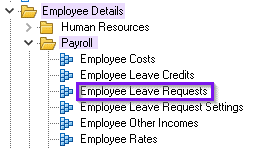
Go to Employee Details > Payroll > Employee Leave Request:
-
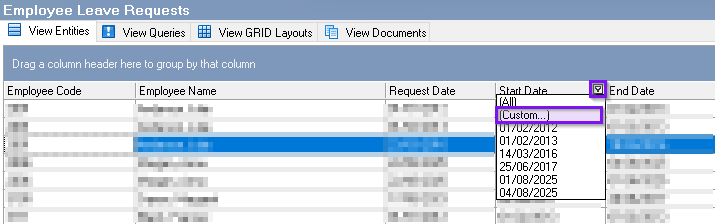
Once you get to this GRID, you can add a filter to the the Start date column and select Custom:
-
In the Custom filter, select "is greater than" and put in today's date (we have used 20/11/2025 in this example) and select OK:
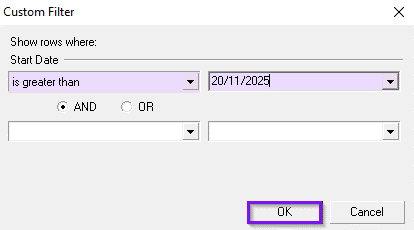
The grid now lists all leave requests with a Start date after today (i.e. from 21/11/2025 onwards).
Notes
-
You can add additional filters for Status (e.g. Approved, Pending) to narrow the list.
-
You can also filter by Department, Location, or Employee to refine the results if you add in the additional columns.
-
After arranging columns and filters, save your grid layout so you can reuse it.
-
Use the grid’s export options if you need to download the results.
-
Leave which ends after the filtered start date but starts before it will not appear when using this filter.
Troubleshooting
No rows returned
-
Check the Filter: “is greater than” excludes today; use “is greater than or equal to” to include today.
-
Confirm the date format matches your environment.
-
Clear or review other filters (Employee, Department, Status) that might be hiding results.
Seeing past leave
-
Ensure the filter is on the Start date column and the condition is “is greater than” or “is greater than or equal to”.
Missing expected requests
-
Verify the request Status (e.g. if you filtered for Approved, Pending requests won’t appear).
-
Remove extra filters, refresh, then reapply only the date filter to test.
Related resources
Grid layouts, grid reports and make-up tables