
About Foreign Employment Income (FEI)?
What is FEI?
Foreign employment income is income you derive as an Australian resident working overseas as an employee.
Australian employers must report an employee's foreign employment income to the ATO to ensure compliance with worldwide taxation laws. As Australian residents are taxed on global income, this reporting allows for correct assessment of tax liabilities, calculation of foreign income tax offsets to avoid double taxation, and proper withholding of PAYG.
To relieve any double taxation, the employee can claim a tax offset (See FITO) when they complete their tax return to reduce the Australia tax liability for any foreign income tax paid.
To substantiate any FITO claims, the ATO use foreign employment income (FEI) reported by the employer via STP.
Note: pre STP phase 2 employers completed were expected to complete the PAYG payment summary (NAT 73297)).
How does FEI reporting affect my organization?
Until v4.78 PayGlobal did not support reporting of FEI via STP.
This meant the continued use of the old PAYG payment summary (NAT 73297) put you at risk of failing to meet your compliance obligations, i.e. risk from:
-
ATO Penalties: Employers may receive administrative penalties for failing to lodge documents on time, including "failure to lodge on time" (FTL) penalties.
-
Single Touch Payroll (STP) Issues: For modern reporting, if FEI is not reported through STP, the ATO may not be able to populate the employee's tax return, leading to audit inquiries for the employer.
-
Employee Impact: Employees cannot easily complete their tax returns, as the income data won't appear in their MyGov account, leading to potential employee complaints to the ATO.
-
Liability for Tax: The employer may still be held responsible for the withholding tax that should have been reported, particularly if they are liable to pay taxes to a foreign government.
-
Increased Audit Risk: Late or missing filings trigger closer scrutiny from the ATO, increasing the likelihood of an audit of the company’s foreign income reporting.
System Configuration
Employee Setup
There are two fields that must be set correctly to ensure their FEI data can been captured/reported correctly they are shown in the Employee | Tax tab below:
-
Foreign income earning - must be set to ‘Yes’, when yes this enables the next field.
-
Associated country - please select the record representing the country the employee is currently work in.
Foreign income earnings must be Australian residents ONLY
You will be prevented from setting Foreign income earner to ‘Yes’ if Residency status is not ‘Resident’
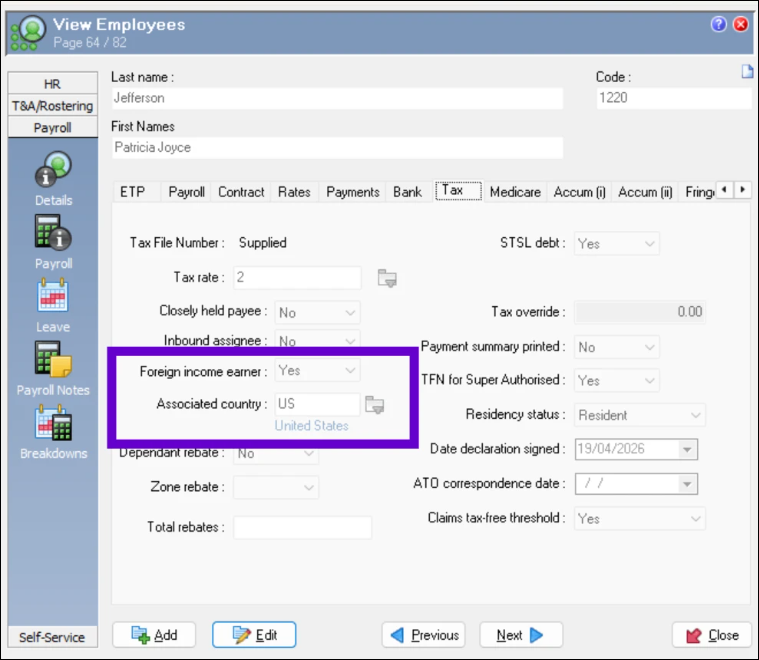
The employee record represents the employee’s ‘current’ state. Details on the Tax tab are what will be used when you process any open pay regardless of whatever the dates on that pay are.
Recording foreign earnings
Under the old Payment Summary process, because none of the data was expected to be entered into PayGlobal you were able to get away with only filling out the PAYG payment summary (NAT 73297) form once per year.
Since the move to STP and specifically where FEI is concerned STP phase 2. Every time the employee receives FEI, then that data should be reported via STP. The ATO use this data to match with the data the employee supplies on their tax return.
To fulfil your STP reporting obligations you need able to record in at least one or more pays literally copy of everything they received overseas, i.e. payments that make-up:
-
Salary and wage
-
Paid leave
-
Allowances
-
Overtime
-
Bonuses & Commissions
-
Director Fees
-
Salary Sacrifice Amounts
-
Lump Sum payments
-
ETP Payments
Basically, data looks like that of a normal “Salary and Wage” (SAW) employee working in Australia. The only difference is money you report needs to be converted from whatever country currency amount it was received as to Australian dollars.
You ALSO, need to capture the FOREIGN TAX PAID (if any was paid).
The only amount you do not record/report for FEI employees is Exempt Foreign Income Amount.
How to enter payment details
-
Option 1 - Manual data entry
-
Option 2 - Import pay (for all transactions except the foreign tax paid - this must be do manually) a standard CSV file is sufficient for this purpose.
Recording the Foreign tax paid
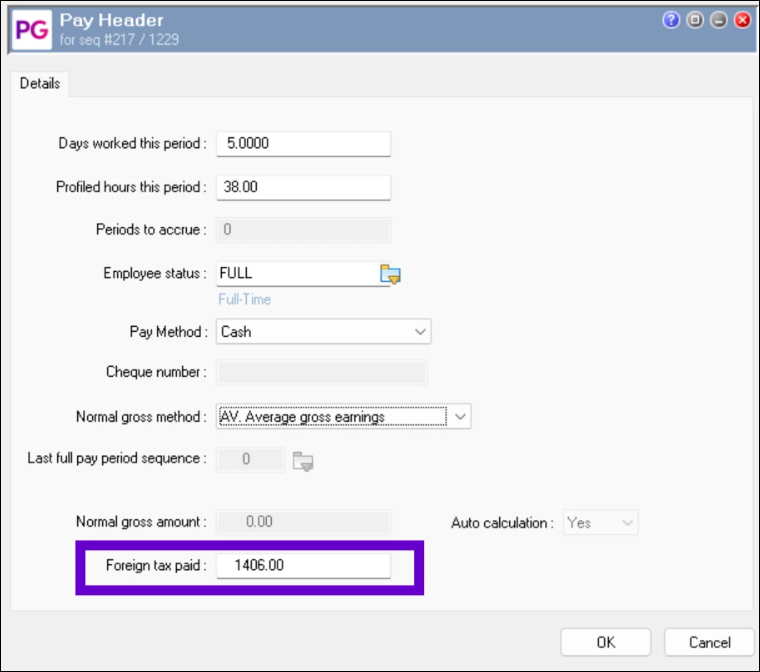
To record the Foreign Tax paid you must add this value manually per employee to each employee’s pay header record.
To prevent paying the employee twice. Check the Pay Method field.
Setting to Cash the usual work-around, to avoid this issue, as most employers who use PayGlobal these days typically pay by Direct credit only.
Preventing double-taxation
The ATO requires a copy of the employee's foreign income details, effectively replicating your payroll processes. When you enter transaction data into your Australian PayGlobal database and process payroll, PayGlobal automatically calculates and deducts PAYGW. If foreign tax has already been deducted and PAYGW should not be deducted, you must manually input a Tax Override transaction.
The recommended setup is to have:
-
Override amount = 0.00
-
Override type = Fixed
Employees with Student Loans
Student Loan (STSL) Whole Pay Tax Override Australian databases have introduced a feature whereby an employee configured with a STSL debt can have the STSL component of the total tax paid in a pay overridden by a fixed amount.
This feature was primarily introduced for handling Foreign Employment Income Earners with a STSL debt whose foreign income is not subject to STSL but can be extended to other scenarios where the student loan component needs to be overridden in a pay. To access this feature, you must create a new Allowance record of Tax Override type with Sub-type Student Loan Override.
Please refer to the 4.78 Release notes for more information Click here
Viewing the Foreign tax
You can customise Transaction View to see the following fields relating to FEI:
-
Foreign income earner
-
Associated country
-
Foreign Tax Paid
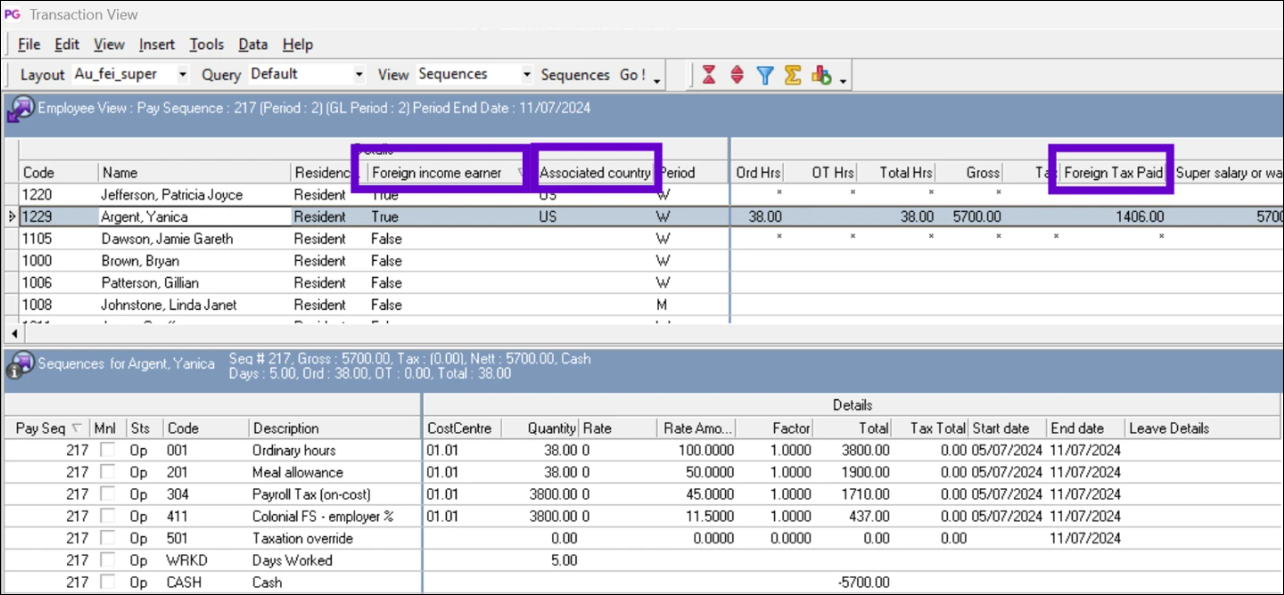
Remember use the “Save Layout as” feature so that you can quickly retrieve a preferred view and quick generation of grid reports.
STP Reporting
Impact of Payday Super
Prior to 2026/27 the only “super” data reported on the PAYG payment summary (NAT 73297) was RESC.
For STP employers had to report at least Super Liability (L) or OTE (O). If you only reported (L) then (O) was optional, as is RESC (R). PayGlobal reports all 3 regardless, if its available. The super amounts only needed to be included in a pay event/update event at least once a quarter where (L) and/or (O) were concerned.
From 1 July 2026, all employers are required to change when they pay Super Guarantee contributions to the employees Superfund from a minimum of once a quarter to EVERY pay day. Specifically, this means the money must reach the employees superfund no later than 7 business days after pay day. There are some exceptions for new employees and those changing providers (20 business days). This change applies to ALL employees regardless of where they are working.
With respect to STP, this means each time you pay the employee/pay the super to your clearing house/superfund provider there are also changes to what must be reported for Super.
The main change for tax years 2026/27 and onwards is that it is compulsory to report:
-
Super Liability (L) - This value also known as the total amount of Super Guarantee that PayGlobal calculated as paid.
-
Qualifying Earnings (Q) - This value replaces OTE as the base for calculating employers' obligations to pay Super Guarantee.
Reporting for 2025/26 and prior tax year amendments on STP2
The ATO expect data to be reported pay-by-pay but for FEI earners, the minimum would be quarterly to avoid Super Guarantee shortfall issues resulting Super Guarantee charges.
The following steps apply:
-
Identify all AU (tax) resident employees who are/were working overseas.
(See Employee Setup) -
Decide how you will enter the data into the pay
-
Import pay - Create an Import pay file. (Recommended if you have many employees)
-
Manual entry
-
-
Open a manual pay - add transaction data
-
Manually enter the “Foreign tax paid” for each employee.
-
Process and close your pay close.
-
Send PayEvent to the ATO – check the FEI amounts in the STP Manager Tool match what you had in the Import pay file and that the pay was successful.
Reporting for 2026/27 onwards
Due to changes in Payday Super, employers must now pay and report both super guarantee contributions and super qualifying earnings for all employees. Consequently, employers with FEI employees must also report FEI data more frequently too.
The same steps as above apply, but instead of being minimum of quarterly, it's now every pay.
STP Updates and Finalisations
The process to create an STP Update Event or STP Finalisation Event remains unchanged for employees with FEI income to report.
For further information on processing Foreign Employment Income, click Here