
When processing employee terminations or other payments that are Taxed using marginal rates, PayGlobal must first determine the employee’s Normal Gross Earnings using the Default normal gross earnings calculation.
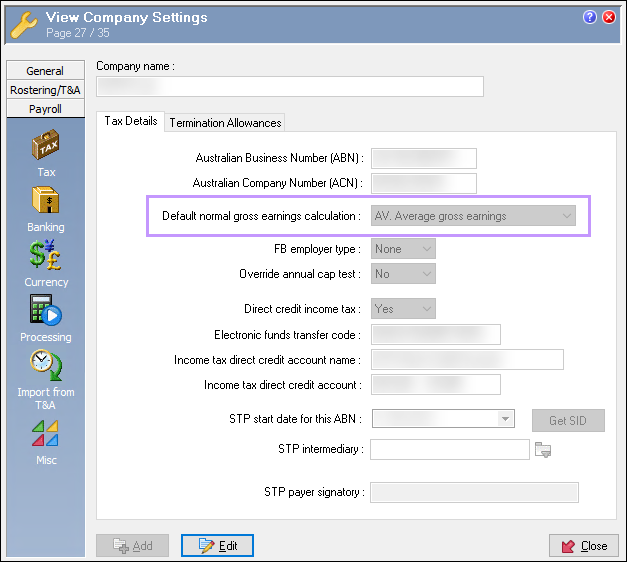
The Default normal gross earnings calculation is set in Modify Company Settings (Administration > Modify Company Settings > Payroll > Tax) and can be one of the following:
-
AV. Average gross earnings
-
LF. Last full pay
-
OV. Override normal gross
Error
If the selected method (commonly AV. Average gross earnings) results in Normal Gross = 0.00 for the employee, PayGlobal cannot calculate tax, and the following error will appears on your Pay Processing Log:

Typical reasons the average gross might be zero include:
-
The employee has no relevant earnings in the averaging period (for example, salary packaging or no ordinary earnings in the YTD).
-
Prior pays were adjusted or rolled back so that the earnings history used for the average is zero.
Resolution
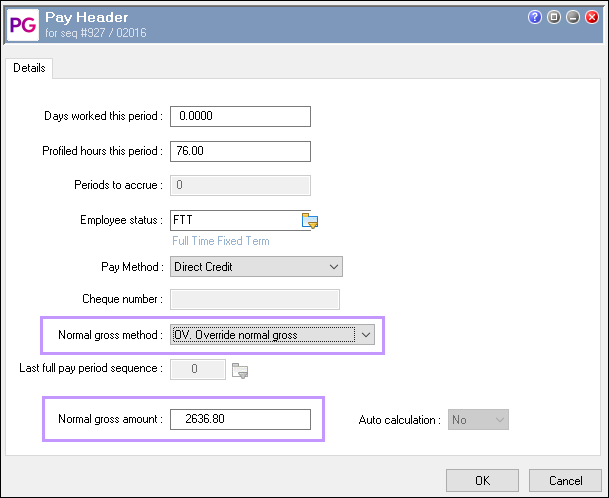
Update the employee’s Pay Header in the affected pay to use OV. Override normal gross, and manually specify an appropriate Normal gross amount for the marginal tax calculation.
Steps
-
Open Transaction View
-
Select the pay sequence that contains the termination pay.
-
-
Select the employee in the pay
-
In Employee Details, highlight the affected employee.
-
In the lower (transactions) pane, click any of their transactions (for example, the termination allowance or days worked).
-
-
Open the Pay Header
-
Press Ctrl + P
or -
Right‑click the employee’s transaction and choose Pay Header.
-
Change the Normal gross method
-
In the Pay Header, locate Normal gross method.
-
Change it from AV. Average gross earnings (or LF. Last full pay) to OV. Override normal gross.
-
Enter the Normal gross amount
-
In Normal gross amount, enter what you consider to be the employee’s normal expected gross earnings for a typical pay period.
-
This is the gross amount that the marginal rates calculation should be based on (for example, their usual weekly or fortnightly taxable gross).
Example:
-
Save and reprocess
-
Click OK to save the Pay Header.
-
Return to Transaction View, save if prompted, and re‑process the pay (F9) for the employee, or for all employees as appropriate.
After completing these steps, you should be able to process the termination pay successfully without the Normal gross earnings for marginal tax calculation is less than or equal to zero error.
Notes and good practice
The Default normal gross earnings calculation is a company‑level setting and may not be suitable for every employee scenario. For edge cases (for example, salary packaging, irregular work patterns, or long gaps between pays), using OV. Override normal gross in the specific pay is often appropriate.
Always ensure the Normal gross amount you enter is reasonable and supportable (for example, based on prior regular pays or agreed salary) so that the PAYG outcome reflects the employee’s usual marginal rate.