
This help page explains the processes for different scenarios related to processing Foreign Employment Income (FEI) in MYOB PayGlobal.
|
Scenario |
What to do |
|---|---|
|
Normal Standard Pay Process during the year |
|
|
Earnings already processed in MYOB PayGlobal as per normal – Full financial year |
|
|
Earnings already processed in MYOB PayGlobal as per normal – Part financial year and still a Foreign Income earner. |
|
|
Earnings already processed in MYOB PayGlobal as per normal – Part financial year and no longer a Foreign Income earner |
|
|
Earnings NOT processed in MYOB PayGlobal |
|
If the employee is not a Foreign Employment Income earner for the full year, only reverse the normal tax for the Foreign Employment Income period. You will need to speak with the ATO or your accounts team to recoup the normal tax paid.
Other information
Processing a tax reversal
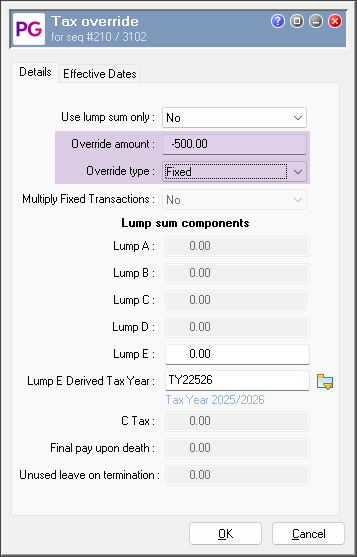
To process a tax reversal in a pay you need to work out the amount to reverse and process it as per the below:
-
In Transaction View add your Tax Override allowance
-
Enter the Override amount as a negative amount
-
Select the Override type as ‘Fixed’
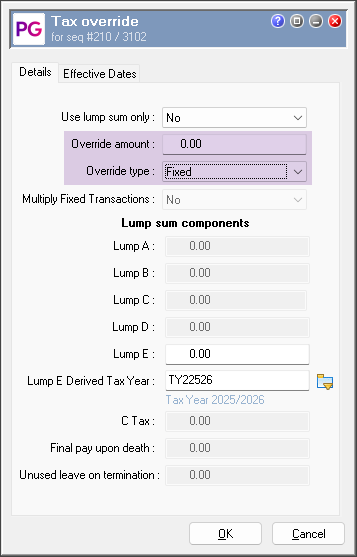
Processing a tax adjustment to reduce the tax amount to zero.
To process the tax adjustment to zero in a pay, follow the instructions below:
-
In Transaction View add your Tax Override allowance
-
Enter the Override amount as a 0.00
-
Select the Override type as ‘Fixed’
How to open the Pay Header in Transaction View
In transaction view you can press CTRL P to open the Pay Header or you can double click on the Transaction code WRKD ‘Days Worked’ transaction.

If the employee was STSL during the FEI period and you need to reverse it, use the new STSL Tax Override function as mentioned in the 4.78 Release notes. Click Here
For further information, refer to the How to report Foreign Employment Income via STP using MYOB PayGlobal page.