
The protected earnings amount (PEA) is the portion of an employee’s wages that is exempt from child support deductions. In Australia, Services Australia updates the PEA each year on 1 January to allow for changes in the cost of living. When this happens, you need to update the amount stored against your child support deductions in PayGlobal.
Before you start
Make sure you have the latest protected earnings amount for your employees’ pay period (weekly, fortnightly, four‑weekly or monthly) from the Services Australia website.
Update the protected earnings amount
From the PayGlobal Tree:
-
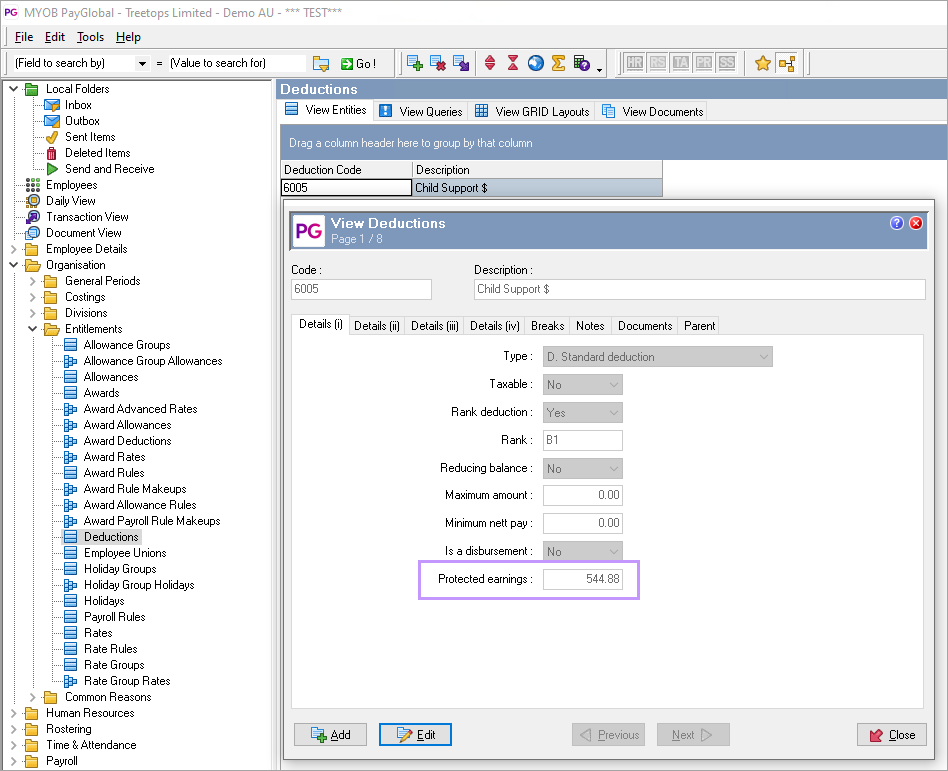
Go to Organisation > Entitlements > Deductions.
-
Locate and open the child support deduction you need to update.
-
On the deduction’s Details (i) tab, find the Protected earnings field.
-
Enter the new protected earnings amount that applies to this deduction’s pay frequency (for example, the weekly PEA for weekly employees, the fortnightly PEA for fortnightly employees).
-
-
Save and close the deduction.
If you have multiple child support deductions
If your database includes more than one child support deduction (for example, separate deductions for weekly and monthly employees), repeat the steps above for each child support deduction so that all use the updated protected earnings amount.