
In MYOB PayGlobal a new Tax Override for STSL additional deductions was introduced in Version 4.78.
Click here to see the Release notes.
This article will take you through setting up the Tax Override Allowance for a fixed override in a specific pay.
We will also go through adding a Tax deduction to process an additional STSL/HECS deduction to add to the current deduction.
Student Loan (STSL) Whole Pay Tax Override (Fixed amount)
Australian databases have introduced a feature whereby an employee configured with a STSL debt can have the STSL component of the total tax paid in a pay overridden by a fixed amount. This feature was primarily introduced for handling Foreign Employment Income Earners with a STSL debt whose foreign income is not subject to STSL but can be extended to other scenarios where the student loan component needs to be overridden in a pay.
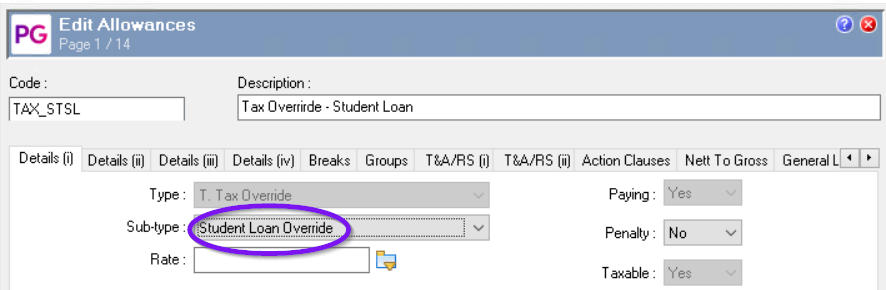
To access this feature, you must create a new Allowance record.
The setup is shown below:
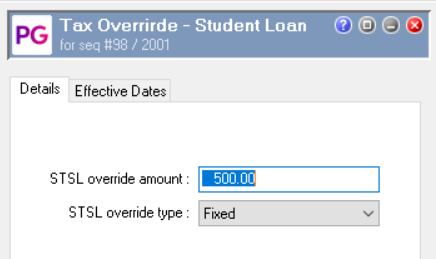
When you enter the allowance into a pay, the form will look like this:
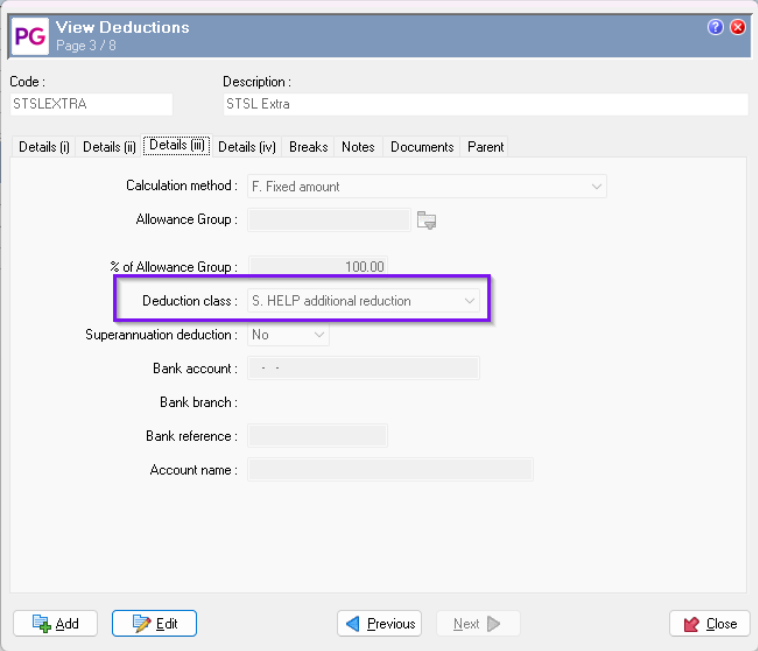
To add to the HECS/STSL debt within a pay by creating a new Deduction with Deduction Class set to 'S. HELP additional reduction'.
Here is an example of the setting on the Deduction.
To add an additional $50 of STSL, you would add the new deduction into the pay.
For example:
Quantity: 1.00
Rate: 50.0000
Transaction Total: 50.00
Recalculate: Yes
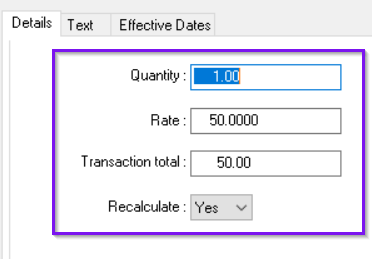
Once you process (F9) the pay, you will see the HELP/Student Debt is increased by $50.
More About Override Types
PayGlobal supports different Override Types that control how the Override Amount affects the calculated PAYG/PAYE.
For detailed information on each Override Type, see Help Topic 2702 – Tax Override Types in the PayGlobal online help:
https://customer.payglobal.com/customer/index.htm#2702.htm
See also the following help article:
Increasing Income Tax (PAYG/PAYE) by a Fixed Amount Each Pay Sequence