
About deleting employee records
You can delete an employee record when it was created in error or is a duplicate, provided it has no payroll history or other records that depend on it.
Important: You cannot delete an employee record after the employee has been paid or included in a closed pay. This restriction applies even when the closed pay contains no payment amount, because the employee’s payroll history must be retained.
If the employee is included in an open pay, remove the employee from that pay before attempting to delete the employee record. For more information, see Delete employee from Pay Sequence.
Before you start
-
Confirm that the employee record is the one you intend to delete.
-
Confirm that the employee has not been paid and has not been included in a closed pay.
-
Check all open pay sequences and remove the employee from any pay where they should not be included.
-
Make sure you have sufficient access to edit and delete employee records.
Delete an employee record
-
Open the Employees grid.
-
Select the employee record.
-
Right-click the employee record and select Delete Record.
-
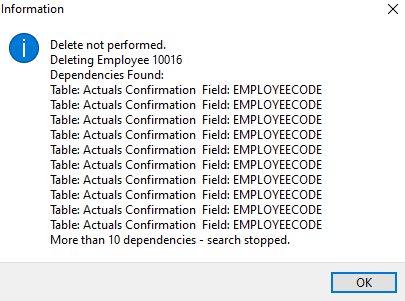
Review the dependency message (example below), if one appears.
-
Remove the listed dependent records from the employee record, then save the employee record.
-
Repeat the deletion process.
-
Confirm the deletion when prompted.
Common dependencies
The exact dependencies depend on the employee’s setup. Before deleting the employee record, check whether the employee has any of the following:
-
A KiwiSaver state or other superannuation-related record that was created in error.
-
A Definition of Week record.
-
A leave or leave-credit record.
-
Profiled hours.
-
Employee rates, shift overrides, next-of-kin records or other employee-specific setup.
-
Transactions, permanent transactions, actuals or confirmation records.
Only remove dependent records when you are certain they were created in error and are not required for payroll or historical reporting. Historical records must not be removed to make an employee deletion possible.
If the employee is in an open pay
If the employee has been added to an open pay but should not be included:
-
Open Transaction View and select the pay sequence.
-
Select the employee and drill down into one of the employee’s transactions.
-
Go to Tools > Delete Employee from Pay Sequence.
-
Select Yes to remove the employee and their transactions from that pay sequence.
-
Return to the employee record and attempt the deletion again.
This removes the employee’s information from the selected open pay sequence; it does not delete the employee record from the database.
If the employee has been paid or included in a closed pay
An employee record cannot be deleted through the PayGlobal front end after the employee has been paid or included in a closed pay. Do not attempt to remove historical payroll records or bypass the dependency checks.
If the employee was included in a closed pay by mistake, contact MYOB Support or engage a PayGlobal consultant for advice. A back-end data correction may be required and may be chargeable.
If dependencies remain
Some dependencies are stored outside the employee record and cannot be cleared through the PayGlobal front end.
If PayGlobal continues to show Delete not performed: Dependencies Found:
-
Review every dependency listed in the message.
-
Check open and closed pay sequences for the employee.
-
Do not delete records that contain valid payroll history.
-
Contact MYOB Support if the dependency is not visible or cannot be removed from the front end.
Frequently asked questions
Can I delete an employee who was paid $0.00?
-
If the employee was included in a closed pay, the employee record cannot be deleted through the front end even if no payment was made.
Can I delete a terminated employee?
Terminating an employee does not, by itself, make their employee record deletable. If the employee has payroll history or was included in a closed pay, keep the record for historical reporting.
Can I delete an employee from an open pay without deleting the employee record?
Yes. Use Transaction View > Tools > Delete Employee from Pay Sequence to remove the employee from that pay sequence only.
What should I do instead of deleting an employee with payroll history?
Keep the employee record and use the appropriate termination or inactive-employee process. If the record was created in error but has historical dependencies, contact MYOB Support or a PayGlobal consultant before making any changes.