
Please read the full page before deleting any errored workflows
Post the Employee Self-Service (ESS) 5.7.2 update to our Australia customers on the 4 June 2026, customer were receiving the following error message when approving or editing workflows. “An error has occurred. An exception occurred on a Workflow service. See the Workflow log for further details”
To resolve the issue, you must delete the errored workflows and recreate any which are still needed. This help page provides the steps to complete this:
-
Log into ESS Admin Site (Instructions: ESS Admin login steps)
-
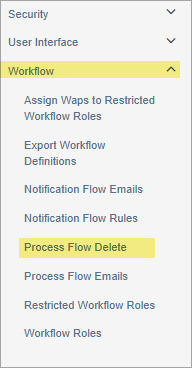
Expand Workflow menu on left to select Process Flow Delete.
-
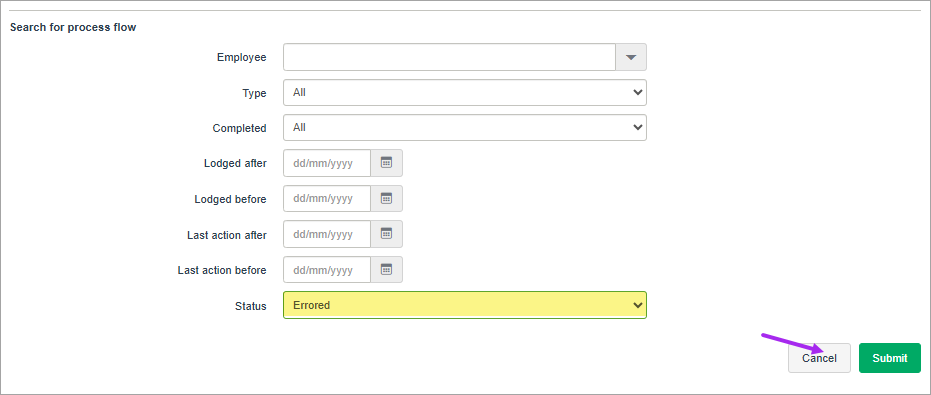
Change Status field from 'All' to 'Errored' and click Submit.
-
Make note of any workflows that could be required to be resubmitted later.
-
If you need assistance in identifying details of the errored workflows for re-entry please reach out to PayGlobal support
-
-
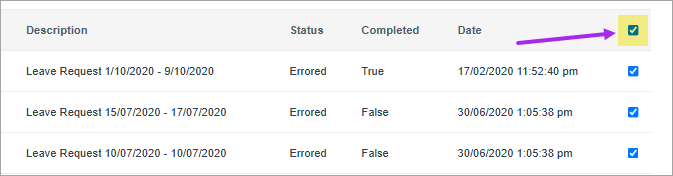
Tick the checkbox at the top of the last column to select ALL these errored workflows.
-
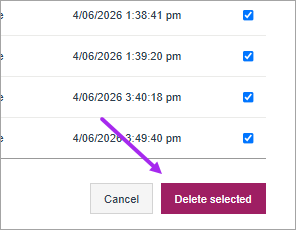
Click Delete Selected at the bottom of the page.
-
Re-enter the required transactions into ESS