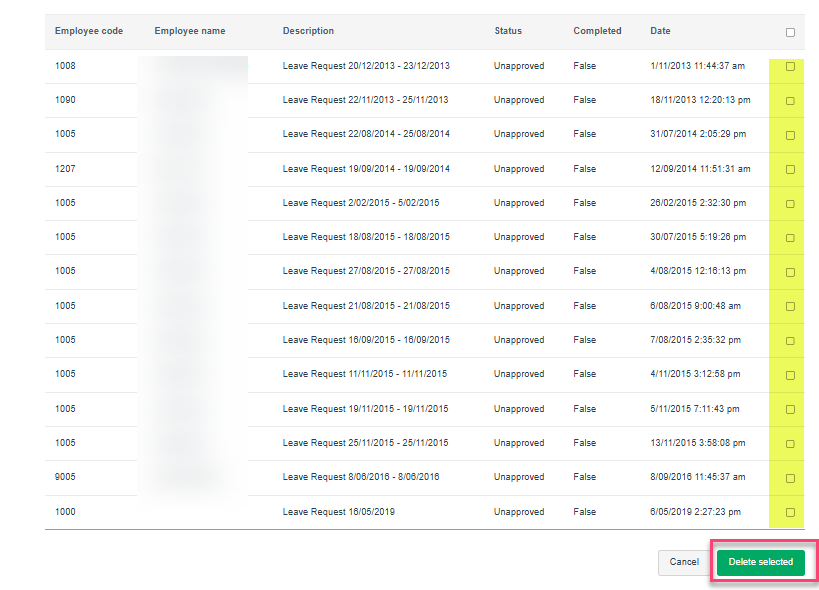
ESS workflow would usually rely on an employee's PayGlobal Status when it comes to visibility and processing.
Pending items such as Leave and Timesheets will remain in a manager’s Active and Pending Items even after the employee has left and usually cannot be actioned in the front end.
If these items are no longer needed, they will need to be deleted from the ESS Admin website by someone with ESS Admin website access (not to be confused with ESS Admin role).
To delete these items:
-
Login to your company’s ESS Admin website. See Help Article on giving ESS Admin Website access ESS Admin - How to give access
-
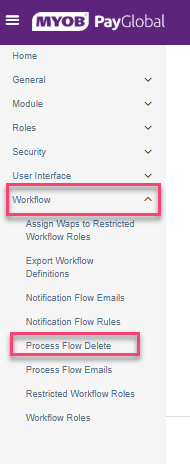
Navigate to Workflow> Process Flow Delete
-
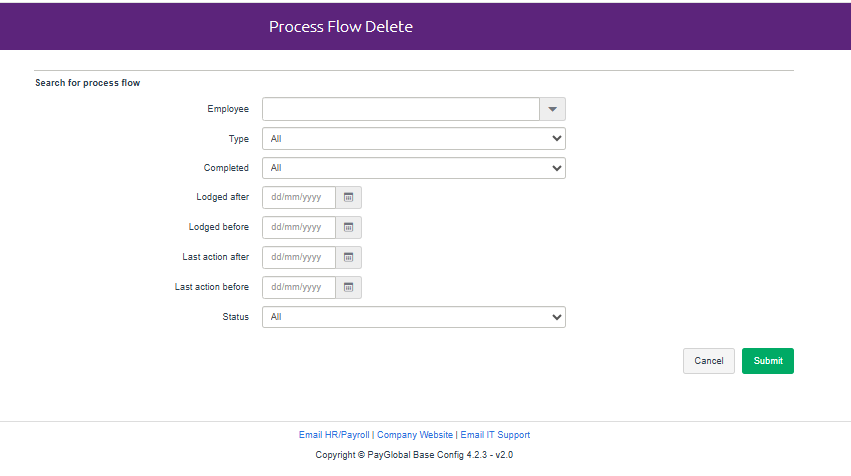
In the Search for process flow section,
-
Leave the Employee section BLANK. Terminated employees are not searchable.
-
Supply the Type according to what you are deleting (Leave, Timesheeting etc)
-
Supply other details available to further limit your search
-
Click Submit
-
-
Look for the item you wanted to delete, put a tick mark on the right side and click Delete Selected