
From time to time, the default KiwiSaver contribution rates may change. When this happens, you can use the Modify option in the Bulk actions menu on the Employees screen to update rates in bulk.
For more information on the current KiwiSaver rates, see Inland Revenue: KiwiSaver for Employers.
Make sure you update KiwiSaver rates, after 1 April, but before the first pay run. Once the changes have synced with MYOB Acumatica — Payroll you can process your pays as normal.
To bulk update KiwiSaver rates:
-
Go to People > Employees.
-
Click Show/hide columns and select the three Kiwisaver fields:
-
KiwiSaver Status
-
KiwiSaver Employee Contribution
-
KiwiSaver Employer Contribution
-
-
Use the Filters menu if you want to exclude certain employees from the list, e.g. a certain position or pay group who you know are already on more than the new default 3%.
-
Select the employees to update by ticking the boxes to the left of their name. To select them all, tick the box next to the First Name heading.
-
Click Bulk actions > Modify.
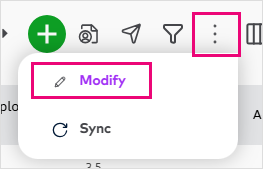
The Modify employees panel opens.
-
Select the Kiwisaver employee contribution (%) from the dropdown menu, and enter the Kiwisaver employer contribution (%) then click Bulk update.
Note that employees can only choose from specific percentages for their contributions, where employers can contribute any percentage above the minimum.
A confirmation screen appears. -
Click Confirm bulk update to complete the change.
Once they're updated, you'll see the new rates on the employee list.