
From PayGlobal release 4.79.0.0 onwards, you can now reset PayGlobal Online passwords for users from the PayGlobal application. This is to reset the login to PayGlobal Online Access Portal.
User Profiles need access to reset passwords
User Profiles will need to be attached to a Security Profile that has ‘Edit’ Access Level to Administration | Security | Reset Active Directory Passwords.
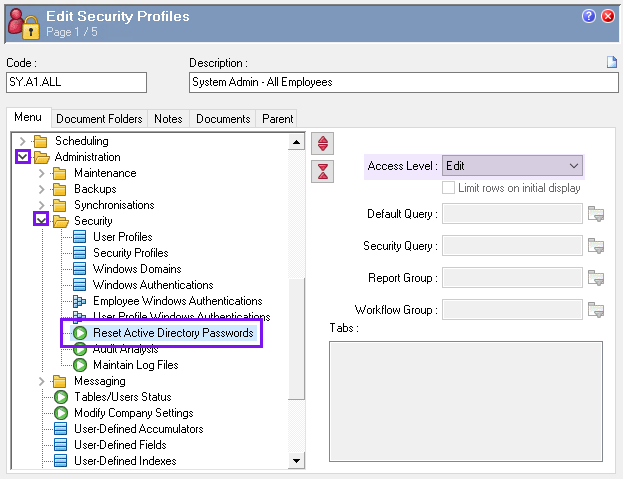
Reset a user’s PayGlobal Online account password
-
In PayGlobal, go to Administration | Security
-
Double-click Reset Active Directory Passwords
-
You can search for the user using the Find user search bar at the top of the page.
-
Click to select the user followed by Start Reset.
A Reset request in progress… message appears at the bottom of the page.
-
When the process finishes, a message is posted advising an email has been sent to the user. Click OK to close.
The email may take a few minutes to arrive and contains a password reset link. The following article details the steps for the user to reset their password using the provided link - PayGlobal Online Password Reset link
If an error occurs
If you receive an error while resetting the password, contact MYOB PayGlobal Support for assistance.
Resetting a user’s PayGlobal User Profile password
See help article - Resetting a Users PayGlobal Application Password