
From April 2026, a Microsoft update for Remote Desktop now prompts users with new security warnings when opening an RDP file. Click here for additional information from Microsoft.
The security warnings prompt users to share local resources including; printers, drives and the ability to clipboard (copy & paste). If you do not tick the boxes to share these resources, this may prevent you from importing pays, synchronising files to an from your local drive.
To access local resources from PayGlobal
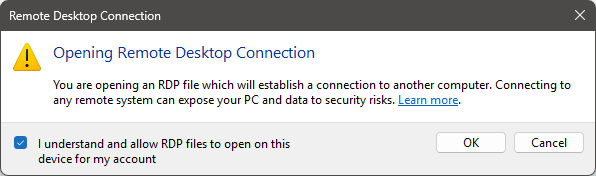
When you login, you will be presented with security warnings.
At the first warning you are prompted to tick the box to confirm you understand you are connecting to a remote computer. Tick the box and click OK.
It is at the 2nd security warning that you tick the local resources you want to access while connected to PayGlobal. They are not ticked or ‘on’ by default.
Also tick the box to remember choices.
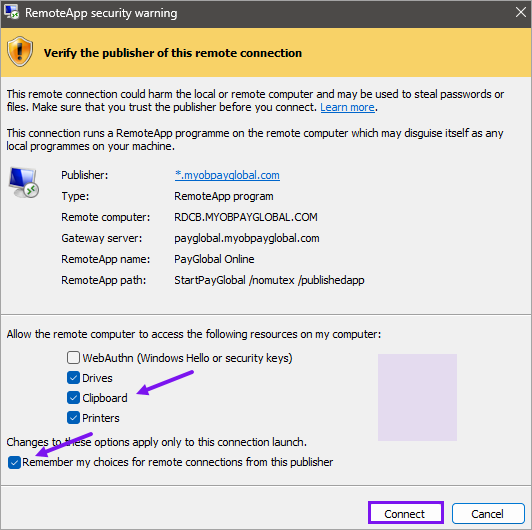
If the options are greyed out.
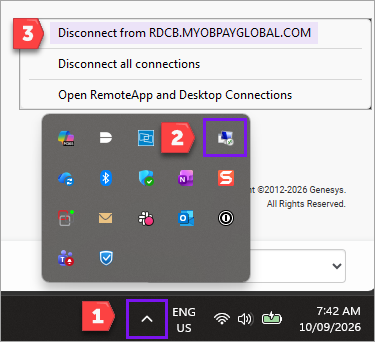
This means you already have an active connection and will need to disconnect to select these options. As illustrated in screenshot below, to disconnect;
-
Click on the up arrow (carat) symbol in your system tray.
-
Right-click on the RemoteApp icon.
-
Click Disconnect from RDCB.MYOBPAYGLOBAL.COM
Once disconnected, please login again and tick the resources when prompted.
Notes for IT teams.
-
This security prompt can temporarily be switched off using instructions in this link directly below.
https://learn.microsoft.com/en-us/windows-server/remote/remote-desktop-services/remotepc/understanding-security-warnings#im-an-it-administrator-how-do-i-temporarily-revert-the-new-security-dialog -
If there is a requirement to disable the user’s ability to clipboard or transfer files between online and local drive? This is managed via local network Group Policy. The Online team allows users to have access to their local clipboard, drives and printers, but they cannot enforce what local resources the user sees.