
MYOB Security Operations are currently reviewing internal mail servers and improving DMARC compliance across MYOB. As part of this commitment to improved email security, they recommended changes to the PayGlobal domains on our mail servers. We have decommissioned some existing domains, and modified configuration to send only from the mail.myobpayglobal.com domain.
What is DMARC and why MYOB is investing resource to fix DMARC across all domains?
Domain-based Message Authentication Reporting and Conformance (DMARC) is a free and open technical specification that is used to authenticate an email by aligning SPF and DKIM mechanisms. By having DMARC in place, we can protect our customer from phishing and spoofing emails that could be delivered using our domains.
With DMARC we can tell the world how to handle the unauthorized use of our email domains by instituting a policy (p=) in your DMARC record and thus improving security of our email domains.
What changed
Starting in January 2025, the below email domains were decommissioned:
If customers had previously received emails from these domains, they are now coming from the mail.myobpayglobal.com domain. For example, the sender payroll@myobpayglobal.com or payroll@payglobal.com will instead become payroll@mail.myobpayglobal.com
Email configuration using decommissioned domains were updated across PayGlobal, Self Service, workflows, integrations & SSRS.
What do customers need to do?
Solution 1:
The mail.myobpayglobal.com domain is already DMARC compliant, making it the most trusted and secure domain for sending email. Customers should already be able to successfully receive email from this domain due to this.
However, to ensure you continue to receive emails sent from our mail servers;
-
ask your IT department to add the following SPF record: mail.myobpayglobal.com
-
for all users that send reports from PayGlobal, update their User Profile email address to @mail.myobpayglobal.com (User Profiles can be found under Administration | Security).
Note: PayGlobal does not support a different 'From' and 'Reply-To' address, so recipients replying to emails about will not reply to the payroll team, and will have to manually add the actual email address if they want to reply to the sender.
Solution 2:
To continue sending emails from company domain (e.g. @myob.com) and stay DMARC compliant, you can change the mail server in PayGlobal Company Settings to use your company’s mail server. The information can be sourced from your IT/Mail Server Administrator and is input in General | Comms | Messaging tab.
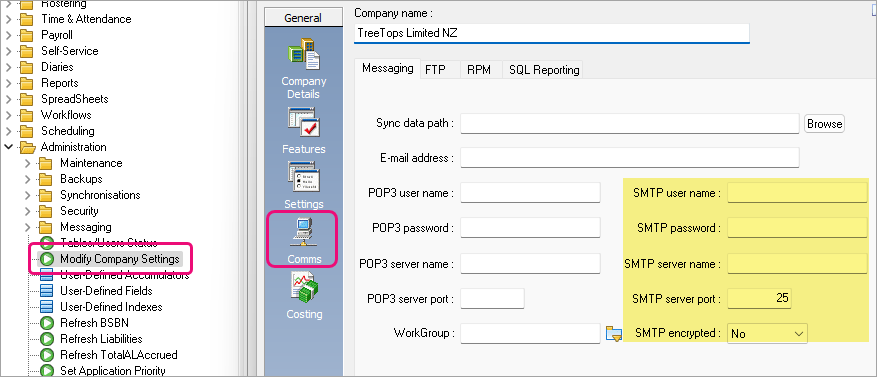
Note: If the mail account requires OAuth or has MFA enabled, this will not work as it is not yet supported by PayGlobal.