
Designer reports (e.g. PGPRHIST001) take a long time to run when a query is used on Employees grid or in the report query (click here to view more details about this problem). This article explains the steps to use a Dim to filter on instead of using a query.
📘 Instructions
-
Expand Administration and double-click Modify Company Settings.
-
Click Settings in General section and then Dims tab.
-
Find a spare Dim label and type Report.Query - it will have Dim# as the label if spare.
-
Click Save + Close and restart PayGlobal.
-
From View Queries tab on Employees grid, activate a query for the employees you want to run the report for.
-
Open an employee record to the Payroll | Payroll tab.
-
Click on the selection icon
Unknown Attachment
-
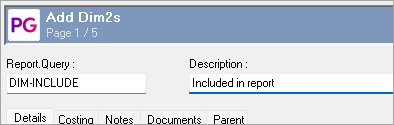
Click Ins or right-click to add record and type in a code and description followed by Save + Close.
-
Click Select to populate the employee field with this setting.
-
CTRL-M or right-click on the field to Model record.
-
CTRL-Spacebar or right-click to tag all employees (these are the employees visible after activating the query at step 5 above).
-
Click Ok followed by Save + Close.
-
CTRL-Q or right-click to Deactivate query.
-
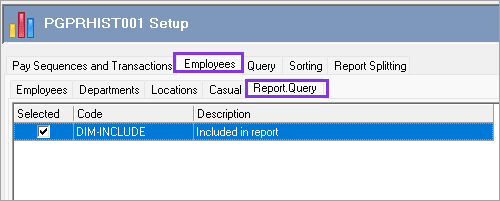
You can now select to run the report for these employees only by selecting this Report.Query Dim under Employees area of Report Settings.
Problem explained (PGDEV-8306)
When a report is run, data is sourced from SQL Server and placed into ADT tables (in the Temp folder) and then the report data is subsequently queried to produce the report output.
Filtering occurs as follows:
-
For the report settings of single Employee, Departments, Locations and any Dim entities configured, the filtering occurs prior to the ADT table generation, hence the report data is a smaller subset.
-
For report settings of “Query”, the filtering occurs after the ADT table generation, hence time is spent downloading data to convert into ADT tables before the filtering is applied, which in larger databases can be quite time consuming.