
Your standard PayGlobal reports (this does not include SSRS reports) are undergoing a phased upgrade to modernise and utilise a newer version of the background tool that runs these (Report Builder Pro/RBPro), including recent updates to payslips. This will impact customised reports that were built based on the original standard reports. The goal is to ensure all reports remain current and fully supported as reporting needs evolve.
Key points for the upgrade process:
All standard reports are being progressively upgraded to align with the latest standards.
Reports updated so far:
|
Old report definition |
Current description |
Old version |
New report definition |
New description |
New version |
|
PGPRHIST003 |
File Analysis Report (deprecated) |
70 |
PGPRHIST003V |
File Analysis Report CSV |
140 |
|
PGPRHIST004 |
File Analysis Detailed Report (deprecated) |
70 |
PGPRHIST004V |
File Analysis Detailed - CSV |
140 |
|
PGPRPRIM903 |
A4 Designer Payslip |
70 |
PGPRPRIM906 |
A4 Designer Payslip RB14 |
140 |
|
PGPRPRIM904 |
Australian A4 Designer Payslip |
70 |
PGPRPRIM907 |
Australian A4 Designer Payslip RB14 |
140 |
|
PGPRPRIM905 |
Australian Z-Fold Designer Payslip |
70 |
PGPRPRIM908 |
Australian Z-Fold Designer Payslip RB14 |
140 |
|
PGPRTRAN004 |
Standard Transactions Report |
70 |
PGPRTRAN004V |
Standard Transactions - CSV |
140 |
|
PGSYDATA001 |
Standard Data Dictionary |
70 |
PGSYDATA002 |
Standard Data Dictionary RB14 |
140 |
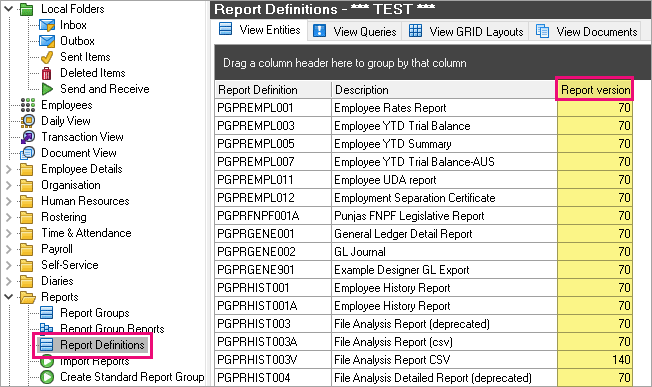
How to see what version your reports are:
Navigate to Reports, then Report Definitions. Press CTRL-U to Customise Columns and add the Report version column.
What next?
-
The first reports planned to be retired from the system are:
-
PGPRHIST003 (replaced by PGPRHIST003V)
-
PGPRHIST004 (replaced by PGPRHIST004V)
-
PGPRTRAN004 (replaced by PGPRTRAN004V)
-
PGTATWL003 (replaced by PGTATWL003V)
-
These 4 reports were superseded by truly CSV compatible versions 3 years ago.
The next reports planned for removal will be the old Australian Payment Summary Reports (PGPRTAXA…). Support for previous versions will continue for now and advance notice will be provided ahead of any end-of-support changes.
-
Custom PayGlobal reports will also require upgrading to maintain compatibility with future releases of Report Builder Pro.
-
As part of the 2026 End of Financial Year (EOFY) tax upgrade package, MYOB will check for custom report files and, where possible, commence upgrading them automatically within the standard package offering.
-
For organisations not adopting the EOFY package, a separate engagement with a consultant may be required to assess and upgrade custom reports.
-
For those looking to modernise PayGlobal reporting and payslip workflows, start by reviewing your current reporting to identify reports that are no longer used and any gaps where new reporting may be required. Then consider evaluating:
-
SQL Server Reporting Services (SSRS): Leverage upgraded SSRS integrations for advanced reporting. Click on either AU or NZ link below to see the available reports (including configurable payslips) and contact Services:
-
Data on Demand (EAP): Gain future BI and analytics capabilities by joining the Early Access Program for PayGlobal's Data on Demand solution, enabling direct extraction of payroll and employee data for use with BI tools:
-
EAP registration: Click here to register
-
-
Modern payslip delivery options: Reduce reliance on manually emailed payslip reports in PayGlobal by using the following approaches:
-
API-based payslips: Continue to generate payslip documents in PayGlobal, then use PayGlobal’s API capabilities to retrieve those payslip documents and deliver them into your data warehouse, HRIS, portal, or other downstream systems. This reduces manual distribution effort by automating delivery of the produced payslip documents.
-
On-demand payslips in ESS: Configure Employee Self Service (ESS) to provide on-demand access to payslips for employees. Instead of generating and distributing payslips manually from PayGlobal, employees can securely view or download their current and historical payslips directly in ESS, reducing administrative effort and improving the employee experience.
-
-
Flexible upgrade options and support pathways are available. Reach out to your MYOB representative for further details on the upgrade process or alternative reporting solutions.