This help article explains how Clock Anchoring, Clock Rounding and Advanced Rounding works.
Clocks - Anchoring
What is Anchoring?
Clock anchoring is used to pin the employee's clock swipe to their rostered times where the employee clocked in or out within a number of minutes of their rostered start time, end time or break times.
How Anchoring works?
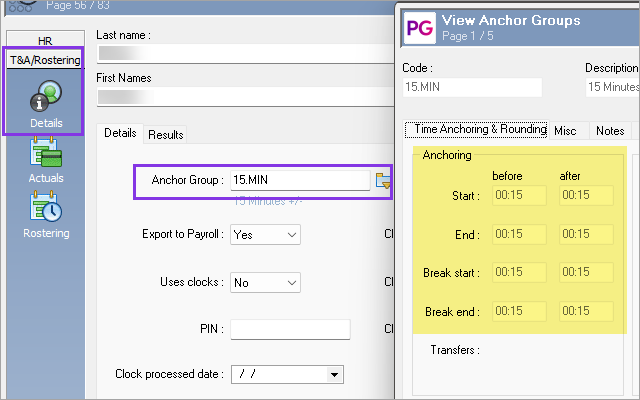
An Anchor Group is setup with the number minutes before and after the roster Start or End time to pin employee’s clocks to to rostered time. The Anchor Group is then attached to the employee record.
In this example below, if the employee clocks in or out within 15 minutes, they will be anchored to the rostered time.
Clock rounding
What is Clock rounding?
Clock rounding is used to pin clocks when they are not within anchoring times. It is used to ensure employees are paid in increments of time that is setup in the Time & Attendance and/or Payroll system.
E.g.
Employee is due to start work at 6:00am and attached to an Anchor Group that anchors to their Rostered time if they clock in within 15 mins, as highlighted in green below.
The same Anchor Group is setup to round Forward to the nearest 00:30 (yellow highlighted).
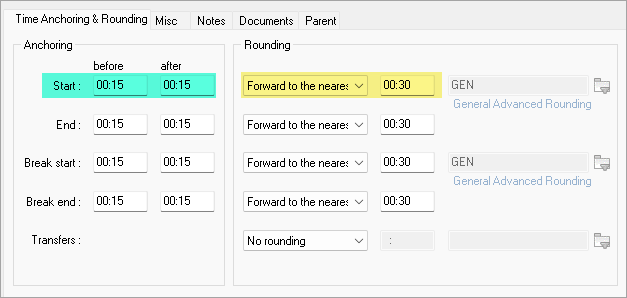
If the employee clocks in at 6:14am, clock processing will set them to a 6:00am start time.
If the employee clocks in at 6:16am, clock processing will set them to a 6:30am start time.
If the employee clocks in at 6:31am, clock processing will set them to a 7:00am start time.
Rounding is setup on the Anchor Group and there are 5 options outlined in PayGlobal Help topic 2596.
Advanced rounding
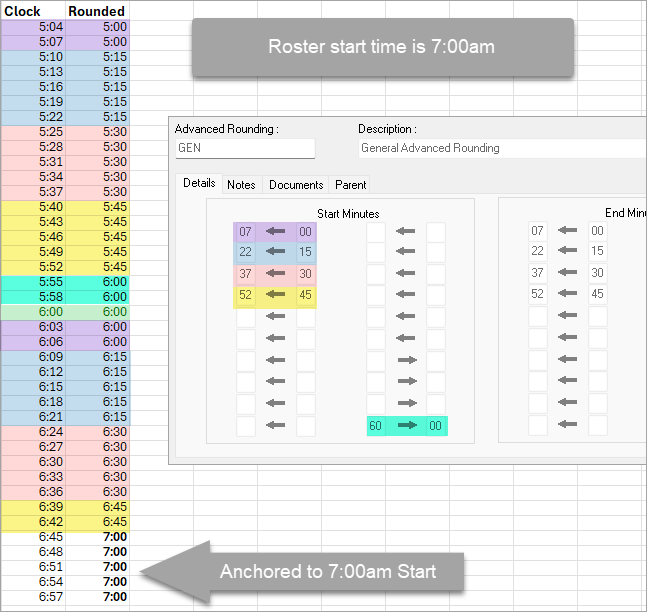
Advanced Rounding is a type of rounding that pins the clock swipe to a particular time if it falls within a time range. For example, some companies prefer to see clock swipes between 9 mins from the hour and 21 minutes from the hour, pinned to a quarter past the hour. They can only use Advanced Rounding for this as other rounding methods won’t work.
Important points about Advanced Rounding:
1. By default, it works off the top of the hour. E.g. 6:00am, 7:00am, 8:00am.
2. This is only for clock times that are not within anchor settings.
The following colour coded chart shows the Advanced Rounding used for an employee rostered to start at 7:00am and using 15 min anchor.