
Understanding and Troubleshooting Award Rules
Award Rules determine everything that is processed in Daily View in PayGlobal. Press CTRL-9 to view ALL transactions, including hidden ones.
Common issues with Award Rules can be grouped into:
-
Award rule not firing.
-
Award rule doing the wrong thing (e.g., paying incorrectly).
-
A combination of both the above.
Troubleshooting Award Rules
To identify why rules are firing incorrectly, examine the following tabs in the Award Rules:
-
Employee Clauses
-
Timeband Clauses
-
Qualifying Clauses
To identify Award Rules that generate incorrect results, examine:
-
Action Clauses
Action Clauses are essential for determining the cause of incorrect behavior.
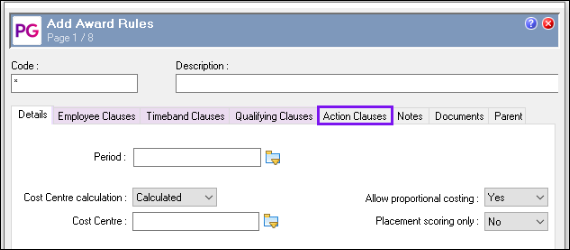
In many cases, there will be Qualifying Clauses that require the existence of other Allowances. When this occurs, you need to look the Award Rule that created the other Allowance.
Special Cases with Clauses
-
Some clauses have an (F) at the end of the description, indicating they are formulas.
-
To view or edit the formula, right-click on the clause and select Edit Formula.
-
Since these formulas are written in NLX coding, further investigation may require the assistance of a consultant.
-
-
Occasionally, formulas may exist but lack the (F) tag in their description. Careful inspection is necessary in such cases.
Testing Changes
Another valuable tool in troubleshooting Award Rules that are not firing, is to process them in the TEST database. The subsequent audit log in the TEST database can help determine:
-
Which clauses pass.
-
Which clauses fail.
Dependencies Between Award Rules
Award Rules must be:
-
Attached to an Award.
-
Ranked appropriately:
-
If Award Rule X depends on allowances generated by Award Rule Y, Rule Y's ranking must ensure it runs before Rule X.
-
Additional Resources
For detailed information about Ranking Rules, refer to Help Topic 10408.
Consultant Support
If further assistance is required with Award Rules or specific clauses, we recommend engaging a consultant. Contact support for assistance.