
This help article covers everything you need to know about the default minimum KiwiSaver contribution rate increase from 3% to 3.5% from April 1st, 2026.
We explain how to update your PayGlobal configuration and KiwiSaver records so that:
-
KiwiSaver minimums are set correctly for the 2026/27 tax year.
-
Employee contribution percentages are updated to at least 3.5%, unless you intentionally keep specific employees at a different rate in line with your policies and IRD guidance.
Important: This article provides system setup guidance only. It does not replace your own legal or tax advice. Always confirm:
-
Your internal superannuation policies and employment agreements (IEAs).
-
Any IRD-approved exception rates (for example, temporary rate reductions).
Before you start
Please click here to view the list of issues at the bottom of this document.
Confirm you’re on the supported NZ tax release
You can do this by navigating within PayGlobal to: Help > About > General tab
Make sure your environment has been upgraded to the 2026 NZ tax release for PayGlobal (which includes support for KiwiSaver rate and contribution changes). If you are unsure, contact your payroll administrator or MYOB Support.
Important Notes:
-
The KiwiSaver Update Tool only updates KiwiSaver Employee % and Employer %. Employees' Salary Sacrifice Ded (%) must be updated manually or through engaging a consultant to complete this.
-
Inactive Superfund records require an End Date for the KiwiSaver Update Tool to operate correctly.
Plan when the new rates should apply
-
The 3.5% minimum applies to pay runs in the 2026/27 tax year.
-
In PayGlobal, you will use an Application Date in the KiwiSaver Update Tool that aligns to the first day of the pay period with a payment date on or after 1 April 2026. (per IR advice) Even if your pay period covers before and after 1 April, your whole contribution for that pay period will be deducted at the new rate.
-
Where the pay is paid early in relation to its PTD date range, NO the new rates don’t apply. e.g. payment date before 1 April but PTD has dates equal to or greater than 1st April within date range.
Example: period dates are 23/03 – 05/04, payment date = 30/03 (period crosses 1st April, but payment date before 1st)
-
Where the pay is paid in-line, with an associated PTD date range, YES the new rates will apply, e.g. payment date on/after 1 April and first PTD for 2026/27 has 1st April in date range.
Example: pay period dates are 23/03 – 05/04, payment date = 01/04 (both period and payment date on/after 1st April)
-
Where the pay is paid late in relation to its PTD date range, YES, where payment date is equal to or greater than 1st of April AND the dates of PTD are less than the payment date, e.g. last pay weekly pay in March paid in first couple of days in April.
Example: pay period dates are 23/03 – 29/03, payment date = 01/04 (period does not cross 1st April, but payment date on/after 1st April)
-
Test first
-
Run all configuration and bulk updates in a test database where possible.
-
Validate results by reviewing the update report, employee records and in a pay process.
Check your policies and exceptions
-
Some employees may be exempt from compulsory employer contributions (for example, under 18 or over 65, depending on when they joined and how long they have been in the fund).
-
From 2026, IRD also allows temporary rate reductions in some scenarios, where an employee may remain at 3% for a defined period while the legislative minimum is 3.5%.
-
You should identify any employees who will:
-
Stay on 3% (for a temporary IRD-approved reduction), or
-
Have different employer contribution policies,
before you run the bulk update.
Create an employee query to exclude employees
-
Where you have identified a group of employees that should not have the update applied, you can create an employee query to ensure they are excluded when running the KiwiSaver Update Tool.
E.g. Query to run for F1 period and excluding employees 10001, 10104 and 10105.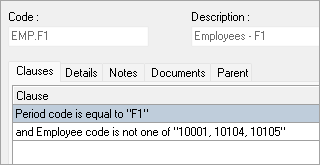
-
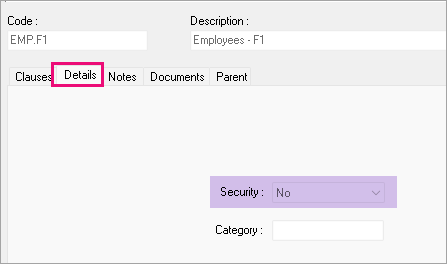
The query’s Details > Security field must be set to ‘No’ for this query to be visible in the KiwiSaver Update tool.
Tip: How to create and manage employee queries can be found in these help articles:
https://customer.payglobal.com/customer/index.htm#1838.htm
https://enterprise-support.myob.com/payglobal/creating-and-activating-a-query
Backup your database before completing the KiwiSaver update on LIVE.
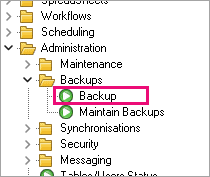
You can initiate a backup from PayGlobal’s tree menu under Administration > Backups. If the backup fails and you are on premise, please contact your IT team for assistance.
Steps to update KiwiSaver rates.
Step 1 – Ensure your KiwiSaver control record is ready
Each time the Government changes KiwiSaver rules (for example, contribution rates or age thresholds), PayGlobal requires a new date-effective KiwiSaver record so the system can apply the correct settings from the right date.
-
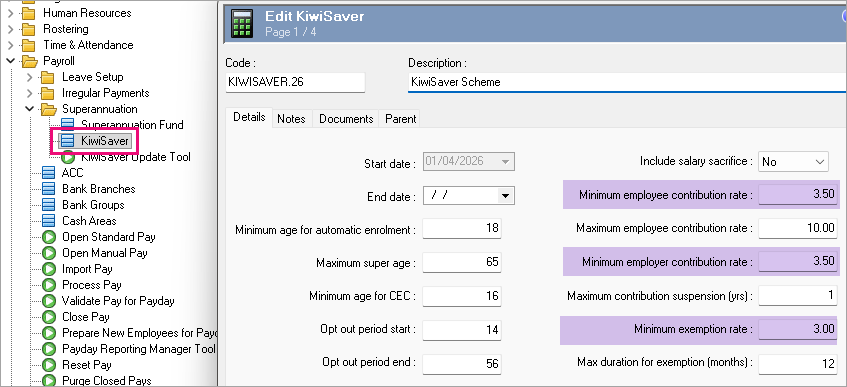
Go to Payroll > Superannuation > KiwiSaver.
-
Check for an existing KiwiSaver record that covers the 2025/26 tax year (with 3.0% minimum contributions).
-
Add a new KiwiSaver record effective 1 April 2026 (or the date specified in your release notes) with:
-
Updated minimum employer contribution of 3.5%.
-
Updated minimum employee contribution of 3.5%.
-
Save the record.
E.g.
Tip: The KiwiSaver control record drives validation and compliance checks. Your Employee Super Funds and Superannuation Fund records must be aligned with this new minimum so that warnings and the KiwiSaver Update Tool behave as expected.
Step 2 – Update KiwiSaver superannuation fund records
Before you update employees, make sure your Superannuation Fund records reflect the new minimums. The KiwiSaver Update Tool does not change these fund-level percentages for you.
-
Go to Payroll > Superannuation > Superannuation Fund.
-
Filter or locate each KiwiSaver or complying superannuation fund used in your database.
-
For each relevant fund:
-
Open the fund record.
-
Update the Allowances tab > Employer (%) to 3.50.
-
Update the Deductions tab > Employee (%) to 3.50.
-
If you have multiple KiwiSaver Superannuation Fund records that should all move to 3.5%, use the Model Field function to copy the new Employer (%) and Employee (%) values to the other records.
-
Save your changes.
E.g.
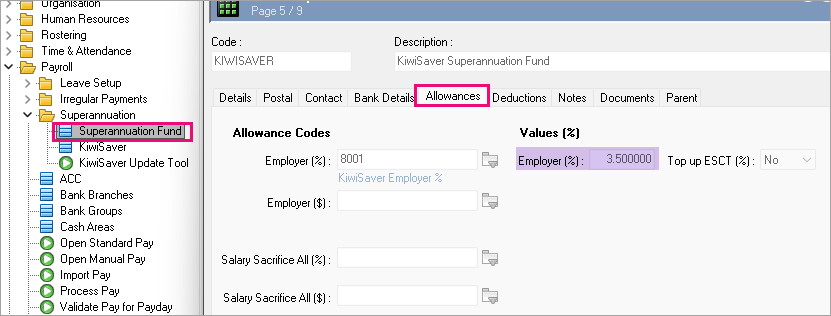
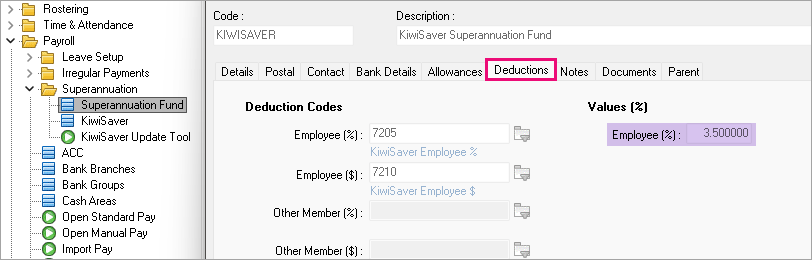
Important: Do not change non-KiwiSaver or noncomplying super funds unless your own policies require it. This article focuses on the KiwiSaver minimums only.
Step 3 – Use the KiwiSaver Update Tool to update employees
The KiwiSaver Update Tool automates updating the Employee Super Funds records so that employee and employer contributions meet your required minimums.
You can use it to move all (or selected) employees to 3.5% for both employer and employee contributions, while leaving exceptions for special cases.
3.1 - Open the KiwiSaver Update Tool
-
Go to Payroll > Superannuation > KiwiSaver Update Tool.
-
The Details tab displays the main options for your update.
Note: The KiwiSaver Update Tool is usually available only to users with Supervisor access in their User Profile.
3.2 - Choose which employees to update
On the Details tab:
-
Query
-
Select a query to filter employees by pay frequency or other grouping, or leave at Default to include all relevant employees.
-
Best practice is to run the tool by pay frequency (for example, weekly first, then fortnightly), so your Application Date aligns with that pay group.
-
Employee
-
Leave blank to include all employees in the selected Query, or select a single employee for testing.
Recommendation: For your first run, set the Query to a small subset (for example, one pay group) and validate the results before running it for all employees.
3.3 - Set the new minimum contribution rates
Still on the Details tab:
-
Update New Min. Employer (%) Contribution – set to Yes and enter 3.50.
-
Update New Min. Employee (%) Contribution – set to Yes and enter 3.50.
-
Include Employee’s Salary Sacrifice (%) in calculation – choose Yes if you want salary sacrifice contributions included when checking whether the employee meets the new minimum; otherwise choose No.
-
Use only KiwiSaver and Complying Funds in calculation – set to Yes if you only want the tool to consider KiwiSaver and complying funds when determining whether the minimum is met.
Important: If an employee has multiple current KiwiSaver or complying funds, the tool sums the contributions across those funds. If the combined rate is already at least 3.5%, that employee is not updated.
3.4 - Set the Application Date
-
Application Date is the date PayGlobal uses to start applying the new contributions.
-
The date must:
-
Be in an unopened pay sequence (you cannot apply changes into pay periods that are already open or closed).
-
Aligns to the first day of the pay period with a pay day on, or after 1 April 2026 (per IR advice).
-
-
If you are unable to select an Application Date prior to the end date of any already opened or closed pay, for any period? Please see here for instructions to work around this problem.
Important: If you have multiple pay frequencies, you may need to run the tool separately for each frequency at the applicable dates.
3.5 - Run in report-only mode first
-
Choose the option to run the KiwiSaver Update Tool in “Report-only“ mode (when prompted, click Yes to report-only).
-
Review the report output:
-
Section A – employees already meeting or exceeding the required minimums (no changes needed).
-
Section C – employees the tool cannot update automatically, for example:
-
More than one fund for the employee needs updating.
-
Configuration or data issues prevent the tool from determining which fund should change.
-
Cross-check the list against your known exceptions (under 18, over 65, special company policies, or temporary rate reductions).
3.6 - Commit the updates
Once you are satisfied with the report results:
-
Re-run the KiwiSaver Update Tool with the same settings.
-
This time, allow the tool to update records (not report-only).
-
When processing completes, review the output again and spot-check a sample of employees:
-
Confirm the Employee Super Funds record now shows 3.5% for employer and employee contributions (unless they were intentionally excluded).
-
Validate that pay calculations (using a test pay if possible) reflect the expected KiwiSaver amounts.
Note: The KiwiSaver Update Tool normally end dates the old Employee Super Funds record and creates a new record with the updated contribution values, preserving your audit trail.
Step 4 – Handle exceptions and special cases
There are several scenarios where you may not want an automatic update to 3.5%, or where additional manual work is required.
4.1 - Age-based exceptions
Legislation allows some age-based exceptions to compulsory employer contributions, for example:
-
Employees under 16 who may have voluntary employer contributions, but not compulsory ones.
-
Employees over 65 where compulsory contributions may no longer apply (depending on when they joined and how long they have been in the fund).
Recommended approach:
-
Use queries or reports to identify these employees before you run the KiwiSaver Update Tool.
-
Exclude them from the bulk update if your policy is to keep different contribution rates.
-
Where required, update their Employee Super Funds manually.
4.2 - Temporary rate reductions (employees remaining on 3%)
From 1 February 2026, IRD allows employees to apply for a temporary rate reduction, so they can stay on 3% (instead of 3.5%) for a defined period.
Key points:
-
Employees apply to IRD, not the employer, for a temporary rate reduction.
-
The reduction is usually timebound (for example, 3 to 12 months).
-
Employers may choose to match the reduced rate for that period, or continue contributing at the new default 3.5%.
Because this is a special case scenario, you should:
-
Identify affected employees using IRD notifications or internal tracking.
-
Exclude them from your main KiwiSaver Update Tool run, or adjust their records after the bulk update.
-
Maintain clear documentation of:
-
The start and end dates of the temporary reduction.
-
The contribution rate to be used during the exemption period.
-
What rate to revert to when the period ends (normally 3.5%).
Note: The PayGlobal 2026 NZ tax release includes changes to support KiwiSaver rate and contribution changes, including handling of temporary rate reductions and related state records. Refer to the specific release notes and detailed KiwiSaver exemption/temporary rate reduction help topic 9709 and help topic 9714.
4.3 - Steps for adding ‘Exempt’ KiwiSaver State.
It is important to always check Processing logs for Warnings and Errors. If you receive the following warning, then the employee record is missing the Exempt KiwiSaver State .
WARN Total KiwiSaver and complying fund employee contribution is $x is less than the 3.5% minimum of Taxable gross which is $x
To add the exemption:
-
Open the employee record to Payroll | Superannuation tab.
-
Confirm they are set to 3.50%.
-
Change to Payroll | KiwiSaver States tab.
-
Right-click to Add record.
-
Ensure Start date is the period start date of 1st pay where exemption applies.
-
State is “Exempt”.
-
Complete remaining fields and click Save + Close.
Next time the pay is processed, KiwiSaver will be at 3% and there warning should no longer appear.
Step 5 – Validate your changes
After you have updated KiwiSaver:
-
Check sample employees
-
Open several Employee Super Funds records that were included in the update.
-
Confirm employer and employee contributions are now 3.5% (unless intentionally different).
-
Run key reports
-
Run Employee YTD Summary and Pay Sequence Detail for the new tax year to confirm that:
-
KiwiSaver contributions are present and at expected values.
-
There are no unexpected variances after the first pay of the new tax year.
-
Monitor the first few pays
-
For the first couple of pay runs in the 2026/27 tax year, spot-check:
-
Employees just under the minimum previously (3%).
-
New starters.
-
Employees with multiple funds or special arrangements (for example, temporary rate reductions).
-
Resolve any anomalies before closing your first pay in the new tax year.
Summary
To prepare for the KiwiSaver minimum contribution increase to 3.5% in PayGlobal, you should:
-
Add a new KiwiSaver control record effective from 1 April 2026 with 3.5% minimums.
-
Update all relevant KiwiSaver Superannuation Fund records to 3.5% for employer and employee contributions.
-
Use the KiwiSaver Update Tool to bulk update Employee Super Funds, running in “Report only“ mode first, then committing once validated.
-
Handle exceptions (age-based and temporary rate reductions) separately, in line with your policies and IRD guidance.
Once complete, your PayGlobal database will be aligned with the 2026/27 KiwiSaver minimum contribution requirements and ready for the first pay of the new tax year.
Issues with KiwiSaver Update Tool
-
KiwiSaver Update Tool adds records to employees with a single Inactive Superfund record if that record does not have an End Date.
Answer/Fix: This is not a Dev issue. Check for these before running the KiwiSaver Update Tool and add an End Date for tool to operate correctly. -
The KiwiSaver Update Tool only updates KiwiSaver Employee % and Employer %, not Salary Sacrifice Ded (%).
Answer/Fix: The Employee KiwiSaver records can be updated manually with the %. If you require many or all employees' Salary Sacrifice Ded (%) to be increased, they can be updated manually or a consultant engaged to update via SQL script. -
The KiwiSaver Update Tool does not allow you to enter an Application Date before any opened or closed Period End Date.
Answer/Fix: Please see here for instructions to work around this problem. -
KiwiSaver Exemption does not work for 1st pay of the new tax year.
Answer/Fix: There are 2 options:
a) don’t include employee in KiwiSaver Update Tool and don’t add the new Employee KiwiSaver Fund record until after the first pay has been closed, or
b) include the employee in KiwiSaver Update and change Employee contribution to 3.00% on Employee KiwiSaver Fund record for first pay, and then set it back to 3.50% for 2nd and subsequent pays. -
Related to 4 above - KiwiSaver Exemption warnings and errors occurring 1 pay late.
E.g. Monthly employee with Employee KiwiSaver fund exception start date of 1/04/2026.
March 2027 pay processing log contains no warning.
April 2027 pay processing log contains the following warning:
Processing 10003 Dawson Andrew
WARN Current KiwiSaver State record has a State of "Exempt". The maximum exemption period of 12 months is due to expire in this pay.
May 2027 pay process fails:
Processing 10003 Dawson Andrew
ERROR Current KiwiSaver State record has a State of "Exempt". The maximum exemption period of 12 months has expired. Process failed.
Answer/Fix: This is with the development team to fix in a future release. -
Related to 4 and 5 above - 3.5% KiwiSaver Employer Contribution allowance is not added to the first pay of the new year for under 18yo.
Answer/Fix: This is with the development team to fix in a future release. The KiwiSaver Employer allowance can be manually added to the first pay and will be added automatically for subsequent pays.