
When creating or updating records through the MYOB Acumatica REST API, you may encounter behaviour where the system appears to ignore values supplied in the request payload.
Examples include:
-
A Supplier with Restrict Visibility To configured returns an error such as:
"The usage of the <Vendor ID> vendor is restricted in the <Branch> branch."
even though the payload specifies the correct branch. -
An AP Bill created with an open Post Period still validates against the financial period derived from the document date, resulting in an error such as:
"The xx-xxxx financial period of the <Company> company is closed in Accounts Payable."
-
Requests behave differently depending on the API user's default branch or company settings.
Cause
The values supplied in an API payload do not always determine the context in which the request is processed.
Before the request is executed, the REST API establishes a session context. Certain business rules are validated using this session context rather than the values contained within the payload.
Depending on the operation being performed, the session context may influence:
-
Branch validation
-
Company validation
-
Financial period selection
-
Access restrictions
-
Other branch- or company-specific business rules
If the API session context does not match the intended company or branch, validation errors may occur even when the payload itself is correct.
Resolution
Where appropriate, include the relevant context headers as part of the API request so the request is executed under the correct company and branch.
For example:
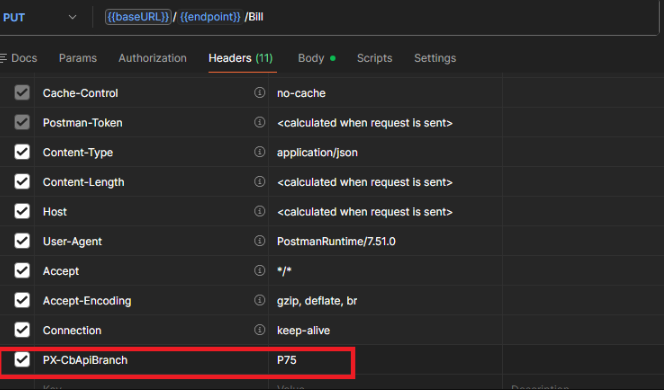
PX-CbApiBranch: <Branch ID>
Setting the appropriate context headers ensures the API processes the request under the intended branch, allowing business rules and security restrictions to be evaluated correctly.