When an employee pays off their entire student loan, the following events occur:
Inland Revenue
The IRD sends the employee a final statement to tell him that their loan account has been closed.
Employee
The employee needs to change their tax code so they:
-
Fill out a Tax code declaration form (IR 330).
-
Give the Tax code declaration form to their employer.
-
Check that they are on the correct tax code on their next payslip.
Employer
-
Uses the information in the employee's Tax code declaration form to change the tax code in the employee's record.
-
Deletes any student loan deductions from the employee's permanent transactions.
Manually adjusting the final deduction
Use this process when the employee’s final student loan deduction needs to be adjusted to a specific amount for the current pay only.
-
Process the employee’s pay normally.
-
Note the student loan deduction amount that PayGlobal calculates.
-
Delete the automatically created student loan transaction from the employee’s pay.
-
Save the change by pressing Ctrl + S.
-
Add a new student loan deduction transaction using the appropriate student loan deduction code.
-
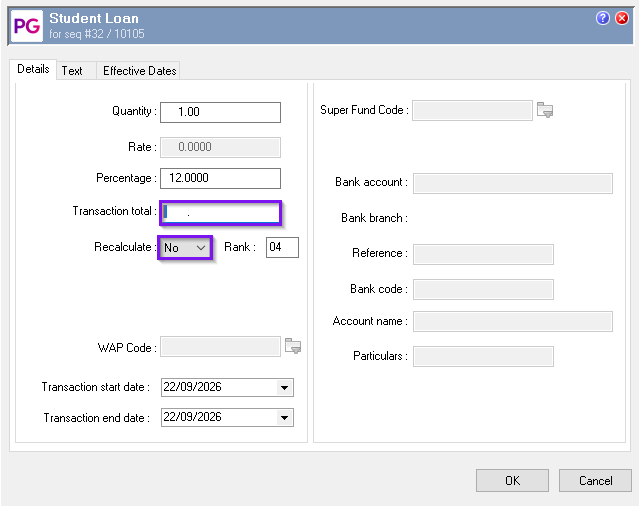
Set the percentage to 12% in the Percentage field.
-
Enter the required final deduction amount in the Transaction total field.
-
Set Recalculate to No.
-
Select OK to save the transaction.
-
Press F9 to process the employee’s pay.
-
When prompted to save the changes, select Yes.
The manually entered transaction will be processed at the amount specified and will not be recalculated when the pay is processed.