
Commencement Date: 1 July 2026
Current Status: Bill introduced 9 October 2025 was passed in House of Representatives on 30 October 2025
ATO Overview
Hear from Emma Rosenzweig, Deputy Commissioner about what Payday Super means for employers. Get ahead of these changes now to be ready for 1 July 2026 Employers – get ready for Payday Super.
Key changes effecting EMPLOYERS
1. Payment Timing
Currently, Super must be paid 28 days after the super quarter period end date at the latest to avoid SGC penalties.
Effective from 1 July 2026, Super must be paid at the same time as wages. Depending on the scenarios, this will result in differences in payment deadlines.
As the change of when you need to pay super may have an impact on your business cashflow, some of you may be considering changing your current salary & wage pay frequencies. I.e. from weekly, or fortnightly to monthly. Please see “Changing pay frequency” for more details.
|
Scenario |
Payment Deadline |
Application/Examples |
|---|---|---|
|
Standard Payment |
7 business days after Qualifying Earnings (QE) i.e payday |
Applies to existing employees with known active funds |
|
First Payment to New Fund |
20 business days after QE day |
New employees onboarding to your organisation OR existing employees changing superfund |
|
Out-of-Cycle Payment |
7 business days after NEXT standard QE day |
E.g., commissions, back pay |
|
Exceptional Circumstances |
20 business days from QE day OR determination date (whichever later) |
Natural disasters (ATO determination required) |
How can I make payments to Super using PayGlobal?
You can use our Direct Credit Schedule report(s).
Product updates for this being planned and more details will be coming soon.
2. Qualifying Earnings (QE) - New Concept
What is QE?
QE replaces OTE (Ordinary Time Earnings) as the basis for super calculations.
The introduction of QE does not fundamentally change the calculation of the minimum superannuation guarantee (‘SG’) contribution an employer must make to avoid becoming liable to the SG charge ('SGC').
Important
You may have additional super obligations under an industrial instrument (award or agreement) to pay super on amounts that are not OTE.
So in reality what is superable for the purposes of fulfilling some employee/employer’s super guarantee (SG) obligations is actually represented by the following diagram.
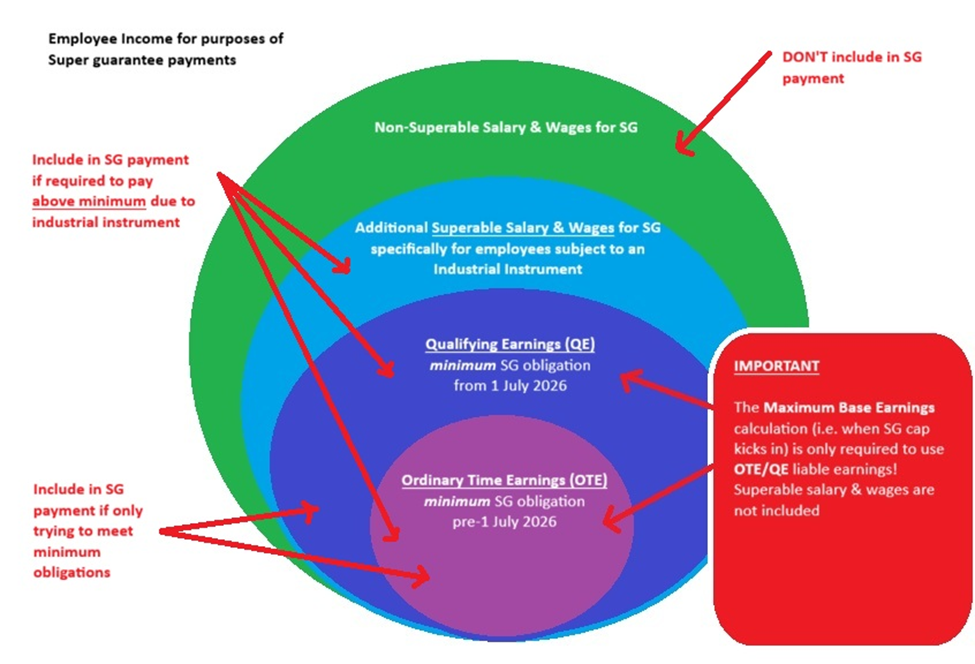
How are QE and OTE different?
QE includes all payments that are currently treated as Ordinary Time Earnings (‘OTE’) for the purposes of the Super Guarantee Administration Act (SGAA), but also includes additional amounts that are not currently OTE.
QE Includes:
-
Ordinary time earnings (OTE) - wages for ordinary hours, most paid leave, most allowances, bonuses
-
ALL commissions (KEY CHANGE – includes: commissions for work outside ordinary hours)
-
Salary sacrifice amounts (included then credited back in calculations)
-
Amounts paid to contractors treated as employees for SG purposes
QE Excludes:
-
Amounts excluded by regulations
-
Amounts exceeding maximum contribution base
-
Paid parental leave, workers compensation (same as current OTE exclusions)
Key Difference from OTE: QE now includes ALL commissions, even those paid for work outside ordinary hours. Previously, ATO accepted these were not OTE for SG purposes.
Further information see Explaining qualifying earnings | Australian Taxation Office
How will PayGlobal support QE?
There are 3 key system changes:
-
QE identification
A new field called “Use in Super Qualifying earnings” is being added to your Allowances.
On upgrade, all existing allowance records is already flagged as OTE, it will be automatically set to be identified as QE. All remaining allowances with “Use in Super Salary and Wage” = Yes, will need to be reviewed/updated in line with ATO guidance documentation.
-
Maximum Base Earnings calc change from quarterly to annual
A read-only indicator will be added to the Super Settings Group record to show how the "Max. Earnings Base" is being calculated. On upgrade, records prior to 2026/27 will show the calculation is OTE and quarterly based. For records 2026/27 onwards, the calculation will show its QE and annual based.
-
QE based SG payment calculation
A new payment calculation method called “Super guarantee (AU)” will be added to Allowances.
On upgrade, all “Z. Employer Super” allowances with Calculation Method “G. Percentage of gross” will be automatically updated to use “Super guarantee (AU)”. This ensures that set-ups who are only paying the minimum SG obligations change from looking at allowances with “Use in Super OTE” = Yes to “Use in Super Qualifying earnings = Yes”
If you have employees on an Industrial instrument, you should review whether you are meeting your obligations correctly. Refer to the diagram above.
If your setups are based on “Z. Employer Super” allowances with Calculation Method “I. Percentage of Allowance Group” or any to other calculation method, please review the setup of your Allowance Groups, Award Rules and Payroll Rules to ensure you remain compliant with the new ATO guidances.
3. STP Reporting Changes
New Fields from 1 July 2026:
· Qualifying Earnings (QE) - reported each payday
· Super Liability - year-to-date super liability
STP Manager Tool will be updated to support new fields relating to Payday Super.
Employer Actions Required:
For the first pay 2026/27 it is recommended STP auto-submission be turned off so that you can validate the QE and Super Liability amounts BEFORE sending your PayEvent to the ATO. See Help article 2114 for details on how to set Automate STP on close pay to ‘No’.
Steps for verification follow:
-
Go to the STP Manager Tool’s Payee Data Superannuation tab.
-
Review the data presented in the new fields.
a. If data is not as expected, roll-back the pay and make corrections as applicable.
b. If data is as expected, send the PayEvent. It will be safe to turn-on auto-submission once the PayEvent is sent successfully.
Important: STP reporting requirements for payee types is NOT changing. Contractors are still voluntary to report via STP (even though QE now includes contractors treated as employees for SG).
4. Super Guarantee Charge - Major Changes
If you don't pay an employee's super guarantee (SG) amount in full, on time and to the right fund, you could be liable for a Super Guarantee Charge (SGC).
If you have your Qualifying Earnings (QE) settings applied correctly to your allowances and you are cross-checking your SG amounts before closing your pays with one of your preferred reports, then you are reducing the risk of SGC.
For more information about what’s changed go here: https://www.aph.gov.au/Parliamentary_Business/Bills_Legislation/bd/bd2526/26bd025
5. SuperStream Reporting
The key outcomes the Government/ATO are attempting to achieve with their Superstream upgrades are:
-
reducing the likelihood of employee contributions being rejected by a super fund.
-
providing clearer error messaging when a contribution is rejected by a super fund.
-
enabling faster payment of contributions.
-
knowing sooner when important super fund details are changing.
For more details go to the ATO website - SuperStream changes
SuperStream contributions messaging to version 3, applies to Payroll applications that offer a fully integrated data solution to a Clearing House solution provider or directly to the Superfund providers only. At this time the ATO have said there are no changes to the SuperStream Alternative File format (SAFF). Unfortunately, there some data differences between the two.
PayGlobal only supports the SAFF file. Selected reports relating to SAFF and Super will be updated to optionally include QE liable amounts.
There are no current plans to provide any new validation services to support SuperStream directing from within the PayGlobal application.
Employer Actions Required
You will need to comply with the new timeline imposed in PayDay Super, this is especially important if the PayGlobal report is used by the recipient to drive the payment side of the process. This means you may need to run the reports you’ve been using for SuperStream more frequently to align with your pay day reports.
Our three standard reports that are used for Super Stream purposes are being updated as part of our ongoing security/infrastructure improvement project. It is likely they will be replaced with new RB14 versioned report definitions. These will be available in the 2026 AU tax release. More details will be available in the Release Notes.
Changing pay frequency
In Australia, an employer cannot unilaterally change an employee's pay frequency if it's different from what was agreed upon in their employment contract or award. Changing to a different frequency is considered a significant change to the terms of employment and requires the employees’ agreement. Employers must adhere to the agreed-upon pay schedule and are required to provide pay on the scheduled date.
Key obligations and considerations
· Contractual agreement: An employer must first check the employment contract or relevant award to see if the pay frequency is specified. If it is, the employer must stick to it unless they get the employee's agreement to change it.
· Employee agreement: An employer cannot simply decide to change the pay frequency without the employee's consent. A change to pay frequency can have a significant impact on an employee's financial planning, so it's considered a major change to their employment conditions.
· Legal framework: While the Fair Work Act doesn't explicitly state rules on changing pay frequency, the general principle is that an employer must pay employees when they are due, which is on the agreed-upon schedule. Changing the frequency without agreement is a breach of the employment contract.
· Communication and negotiation: If an employer wishes to change the pay frequency, they should discuss the change with the employee, explain the reasons for the change, and negotiate a new agreement.
· Notice period: If an agreement is reached, the change should be implemented with sufficient notice, and the change to the new pay frequency and date should be confirmed in writing.
· Employee leave balances: Changing an employee's pay cycle can cause their leave to accrue more slowly or more quickly per pay period. Of course, their entitlements won’t change, but you might need to explain this to employees if they notice the difference on their pay slips.
· Payroll reports: Leave transactions and balances will only be updated in reports after a pay run is processed with the new pay cycle settings.
Unless there has been a signed agreement by all affected parties to change your employee(s) pay frequency, then it is recommended that you don’t do it, as you may risk breaching your compliance obligations.
IF there's been a signed agreement, check if you already have an existing pay period code for the affected internal company/companies that is linked to the pay frequency with a current/future calendar setup.
· Yes - then choose an appropriate cross-over date to change your employee’s pay period codes. Timing is important because you’ll want to ensure the last pay on the old pay period code is completed (closed) and related STP PayEvents successfully submitted BEFORE changing to the new pay period code with a different pay frequency.
· No - you will need to create new Pay period record. Do not just change the pay frequency setting on your existing pay period record, this will cause disruption to your historical data, accumulator rebuilds and ability to complete rolling back of pays in the future if needed. Setting up new pay period may involve needing to ensure the new record has the same Allowance, Deduction and Payroll Rules setup or at least a review to make sure what you bring across is still fit for your current business needs. If you have not done this sort of task before it is recommended to engage with our Professional Services team to ensure the process works smoothly.
Also, keep in mind that pay periods may overlap when changing pay frequencies. In these scenarios, you need to be prepared to make manual adjustments to both pays to ensure the employee gets paid correctly, as there will be a risk you could under pay or double-up depending on your unique system configurations.