BNZ have changed the way their bank feeds work. To support this, we’ve simplified BNZ bank feed setup with a new API-based process. As of 17 November 2025, BNZ bank feeds that were set up using the old process have stopped receiving transactions.
To continue receiving BNZ transactions, apply for new BNZ bank feeds as soon as possible.
For other financial institutions, you’ll continue receiving bank feed transactions as usual.
Noticed any other bank feed issues? Let us know by raising a support ticket.
Only the latest versions can use BNZ bank feeds
You can only reapply for new BNZ bank feeds on versions 2025.1, 2025.2 and versions that will be release in the future.
If you stay on a version older than 2025.1, you can’t receive BNZ transactions or apply for BNZ bank feeds after 17 November 2025.
Update automation rules to work with the new BNZ account format
As part of switching to the new API-based feed, the BNZ account formats has changed.
If you have automation rules or reconciliation processes that rely on the old format, you have to update them to the new format.
These changes do not affect bank feeds with other financial insitutions.
What's changed?
What changed?
What you’ll notice in Exo / your rules
What you may need to change
Account number format in text
Account numbers in the “Other A/c …” part of the text are now hyphenated (e.g. 02-0816-0290880-000 instead of 208160290880000).
Any rules or scripts that look for a 16‑digit account pattern in the text need to be updated to accept the hyphenated NZ format instead.
“Other A/c …” sometimes missing
For some lines (especially fees, interest, loan movements) the “Other A/c …” section may disappear entirely in the API feed.
If you previously matched on the “Other A/c …” part for those transaction types, you may now have no account number to match on and will need a different rule (e.g. by description only).
Particulars field mostly empty
The Particulars column is now blank for most BNZ API transactions; the descriptive text is usually pushed into the main narration/text instead.
Any automations that rely on Particulars (rather than the main text) will stop triggering reliably. Update rules to read from the narration/text field instead of Particulars.
Narration/text is more structured
Narration is often longer and more standardised by type. Some types (e.g. card purchases) now include extra markers like NZDxxxxx and sometimes a timestamp before the code (e.g. PUR).
Exact string‑match rules on narration may need to be loosened (e.g. use “contains” or specific key phrases) to tolerate the extra markers and formatting changes.
TranTypeCode simplified
Historically, internal transaction types were quite granular (e.g. AUTOPAY, DEPOSITS1, INTEARNED, etc.). In the BNZ API data these are mostly just DEPOSIT or WITHDRAWAL now.
Any reports or rules that depended on the old, very specific TranTypeCode values will now see broader DEPOSIT/WITHDRAWAL values and may need to be redesigned.
Where you can find details
Information that used to be split between Narration + Particulars + TranTypeCode + “Other A/c …” is now concentrated mostly in Narration (with Particulars often empty).
Treat the narration/text field as your primary source of meaning. Avoid building new rules that depend on Particulars or legacy TranTypeCode being populated.
Cheat sheet by transaction code
Note: BNZ “tranCode” will always be 0 and will not be populated with any code. “tranCode” is different to “TranTypeCode”.
Code
Type (plain English)
What changed in BNZ API format (vs CORE)
Why your rules might break
AP
Auto payment
Keeps Other A/c; account in text now hyphenated; Particulars that used to be populated are now mostly empty; TranTypeCode normalised to DEPOSIT/WITHDRAWAL.
Rules that pulled debtor account from un‑hyphenated text or relied on Particulars will no longer match as before.
BP
Bill payment
Other A/c still present; accounts now hyphenated; Particulars mostly cleared; TranTypeCode simplified to DEPOSIT/WITHDRAWAL.
Matching rules that use Particulars or expect a non‑hyphenated account string need updating.
DC
Direct credit (incoming)
Other A/c still present; account now hyphenated in text; Particulars that were usually populated are now 0% in the dataset; TranTypeCode normalised.
Rules extracting customer account or invoice numbers from Particulars may fail; use narration instead.
DD
Direct debit
Other A/c still present for most lines; account hyphenated; Particulars cleared; TranTypeCode is WITHDRAWAL.
Any direct‑debit matching that relied on Particulars text will need to be rebuilt around narration.
CR
Credit / card deposit
Other A/c present; account hyphenated; Particulars now empty; TranTypeCode normalised to DEPOSIT.
Rules that separated card deposits using Particulars content may no longer fire; use narration.
FEE
Fees & charges
Other A/c often removed; Particulars cleared; account usually not shown; TranTypeCode standardised to WITHDRAWAL.
If you used the Other A/c account to drive fee rules, it may no longer exist. You may need to rely purely on the description.
FT
Funds transfer
Other A/c retained; account often hyphenated; Particulars are more often retained than for other codes but still leaner than CORE; TranTypeCode DEPOSIT/WITHDRAWAL.
Most rules should still work, but any that expect old account format or specific Particulars patterns may need minor tweaks.
INT
Interest
Other A/c often omitted; Particulars cleared; TranTypeCode changed from INTEARNED to DEPOSIT/WITHDRAWAL.
If you filtered interest using INTEARNED or relied on Particulars text, you’ll need to update filters.
PS
EFTPOS settlement
Other A/c retained; account hyphenated; Particulars cleared; TranTypeCode normalised to DEPOSIT.
EFTPOS settlement rules depending on Particulars or account format may stop matching.
PUR
Card purchase
No Other A/c; Particulars always empty; narration now includes NZDxxxxx amount token and often an ISO‑like timestamp before PUR.
Any rule expecting a short “merchant‑only” description, or reading data from Particulars, will need to account for the extra tokens in narration.
If you previously keyed off the Other A/c or Particulars, you’ll need to switch to narration‑based rules.
TL
Term loan movement
“Other A/c …” sometimes omitted; Particulars cleared; TranTypeCode standardised to WITHDRAWAL.
Loan‑related rules driven by Particulars or Other A/c may now have less information to work with.
TP
Tax payments (IRD etc.)
Other A/c retained; account hyphenated; Particulars is one of the few fields that remains consistently populated compared to other codes.
Most existing tax‑payment rules should continue to work; just be aware of the new hyphenated account format.
To apply for new BNZ bank feeds
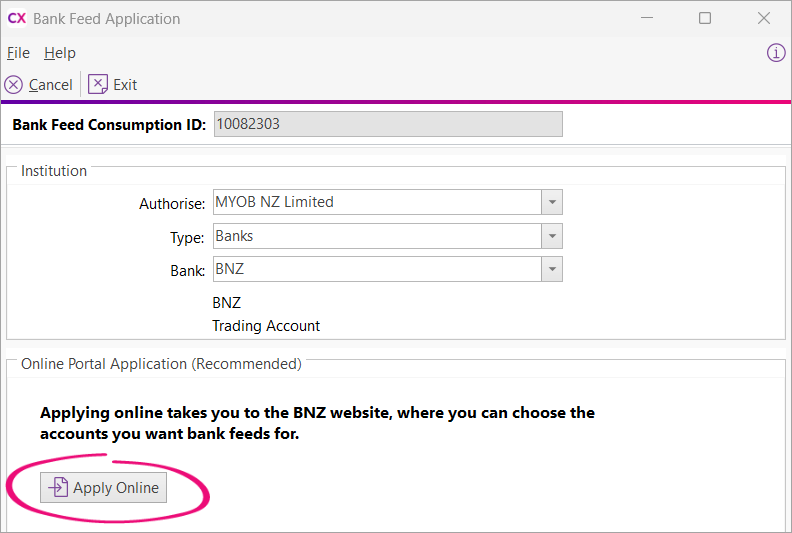
An administrator can apply online on the Bank Feed Application screen.
Log in to MYOB Exo Finance and go to Transactions > Bank Feeds.
On the Bank Feeds screen, click Manage Bank Accounts.
Log in with your administrator credentials.
On the Setup Bank Feeds Accounts screen, click Add a bank account.
For the Bank, choose BNZ.
Click Apply Online.
Complete your application on the BNZ website.
After the application is approved, you will start getting transactions for the bank feed on 17 November 2025.
Associate your new bank feed with a general ledger (GL)
After the 17 November 2025, complete these steps:
Log in to MYOB Exo Finance and go to Transactions > Bank Feeds.
On the Bank Feeds screen, click Manage Bank Accounts.
Log in with your administrator credentials,
On the Setup Bank Feeds Accounts screen, there are two bank feed IDs for the same bank. The new BNZ feed will start with ‘B’.
Double-click the new feed to associate with the correct GL account.