If you have been linked to this page from in product notifications, it means we detected a duplication in your Public Holiday lists.
We have now deployed Public Holidays templates for the following dates:
|
Country |
Years |
|---|---|
|
Australia |
2025,2026 |
|
New Zealand |
2025 |
This could have resulted in a duplication of public holidays in the following circumstance:
-
You already had a public holiday configured AND
either;-
The public holiday was configured for a state level but we applied it at a country wide level
-
The public holiday was configured at a location level, but we applied it at a state or country level.
-
There is a small chance that if this isn’t corrected then you may see doubled hours calculated to Public Holiday Worked or Public Holiday Not Worked codes.
To correct:
Go to the Holiday Settings screen: https://app.advancedteam.myob.com/settings/holidays
Identify the duplicate holiday
Edit the duplicate you want to delete, then delete it
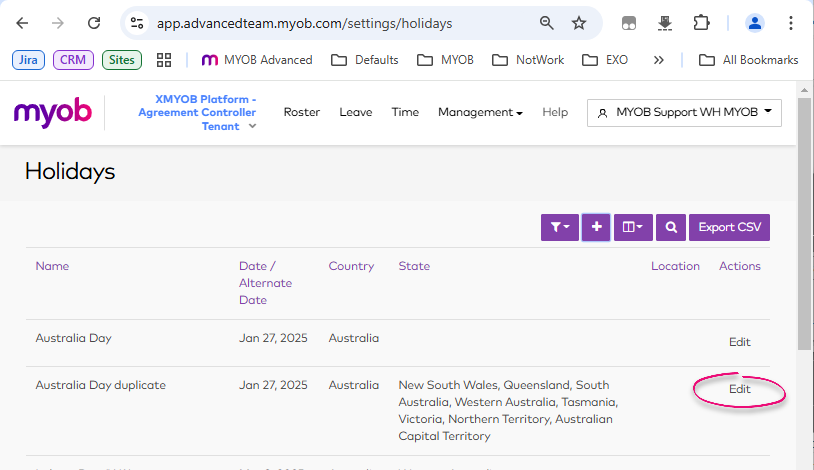
In the above example, Australia day duplicated because there was already a state level version of the holiday when the template was applied.
We recommend deleting the more specific holiday in this situations.
On the other hand, if you have a State/provincial Holiday entered as a national holiday, we would recommend deleting the National version.
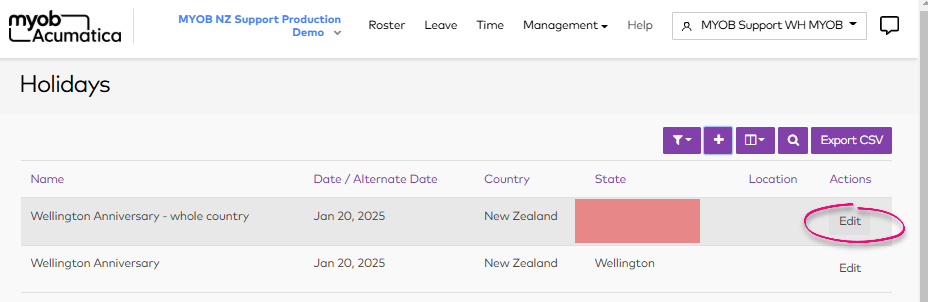
This is to prevent the holiday from incorrectly applying to other states/provinces.
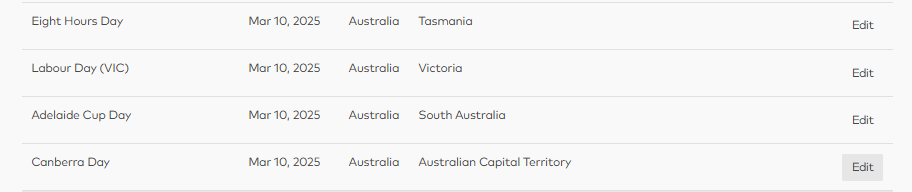
Holidays in different states aren’t a problem
Duplicates in different states on the same day are not an issue, for this reason we have loaded the March 10th holiday under its 4 separate names for the specific state, to make the Roster display the correct holiday if viewed from that region.