
This page explains how KiwiSaver interacts with PayGlobal, and what you need to check so KiwiSaver works correctly in payroll.
1. PayGlobal requirements for KiwiSaver
For KiwiSaver to function correctly in PayGlobal, each employee who is a KiwiSaver member must have both of the following:
-
A current KiwiSaver Superfund record
-
Set up under:
Payroll > Payroll > Superannuationtab of the employee record.
-
-
A KiwiSaver States record
-
Set up under:
Payroll > Payroll > KiwiSaver Statestab of the employee record.
-
Both records must be correctly aligned.
1.1 Aligning Superfund and KiwiSaver State
PayGlobal expects a consistent story between the employee’s Superfund and KiwiSaver State:
-
If the employee has a current active KiwiSaver Superfund record, they must also have a KiwiSaver State with a State of “In” or “Holiday”.
-
If not, you will see this error when processing pays:
ERROR Has a current KiwiSaver SuperFund, but no KiwiSaver State record with a State of "In" or "Holiday". Process failed. -
-
If the employee has a KiwiSaver State with a State of “In” or “Holiday”, they must also have a current active KiwiSaver Superfund.
-
If not, you will see this error:
ERROR The employee needs to have a current active superfund given the employee has a KiwiSaver state of "In" or "Holiday". Please fix. -
Examples:
-
Superfund
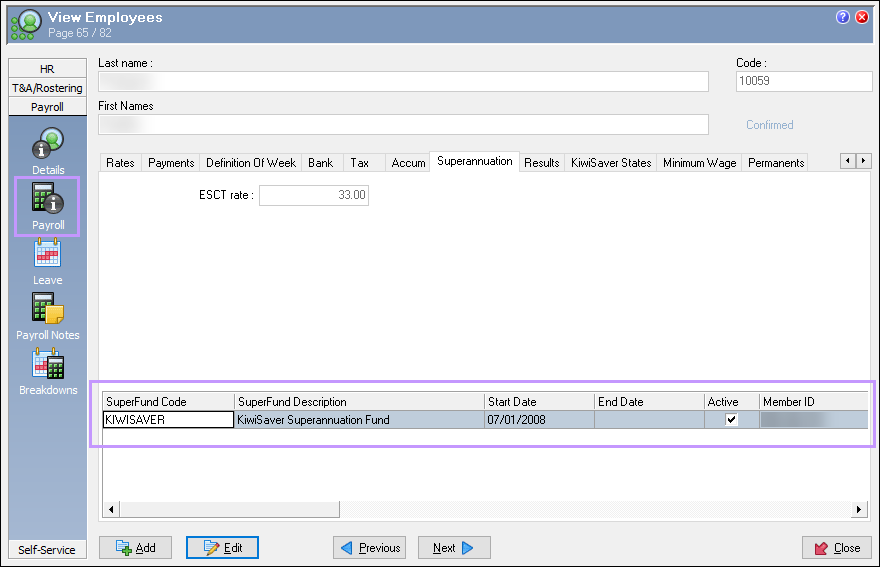
-
KiwiSaver State
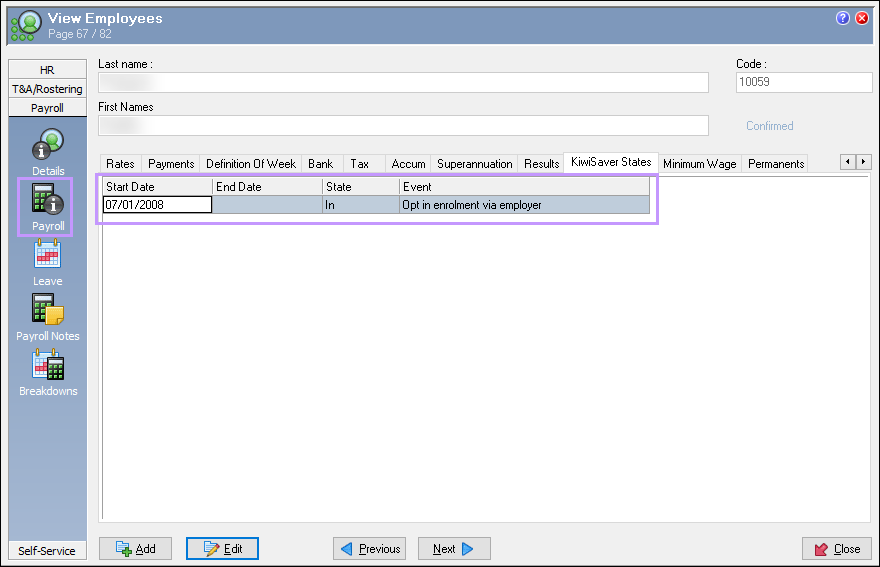
1.2 How to fix alignment errors
If you see either of these errors when processing pays:
-
Confirm whether the employee should be a KiwiSaver member under current legislation and IRD guidance.
-
Depending on the outcome:
-
If they are or should be a KiwiSaver member:
-
Ensure there is a current active KiwiSaver Superfund record.
-
Ensure there is a KiwiSaver State with State = “In” or “Holiday” (as appropriate).
-
-
If they are not a KiwiSaver member:
-
End‑date or deactivate any KiwiSaver Superfund that should no longer be active.
-
Update the KiwiSaver State to the appropriate non‑member state (for example, per Help topic 9714), or remove an incorrect state record.
-
-
2. Choosing the correct KiwiSaver State
When setting up or updating employees, it can be confusing which KiwiSaver State and Event to use.
The state chart in Help topic 9714 is especially useful for deciding which state is appropriate for a given situation. Refer to that chart whenever you are unsure which state to select.
Important:
The “Never been a KiwiSaver member” event must not be used for new employees at the time of hire.
-
This event is intended for existing employees who have never joined KiwiSaver, typically long‑serving staff who may have been employed before KiwiSaver was introduced.
3. New employees and KiwiSaver
New employees generally fall into one of three categories:
-
Existing KiwiSaver member (already in KiwiSaver through a previous employer or directly with a provider)
-
Eligible for KiwiSaver but not a member
-
Ineligible for KiwiSaver (for example, too young, or otherwise not meeting KiwiSaver eligibility rules – refer to IRD guidance)
3.1 Existing KiwiSaver members
For new employees who are already KiwiSaver members:
-
Record their KiwiSaver details in the Superannuation tab.
-
Set up a KiwiSaver State that reflects their current status (for example, In or Holiday), based on the information they provide (including any savings suspension / holiday).
3.2 Eligible but not yet members
For new employees who are eligible but not yet KiwiSaver members:
-
In most scenarios, employers must automatically enrol eligible new employees in KiwiSaver, unless an exemption applies.
-
In PayGlobal:
-
Set up the KiwiSaver State and Event according to the guidance in Help topic 9714 and your obligations under the KiwiSaver Act.
-
Ensure a KiwiSaver Superfund is created once they are enrolled and a provider is known (either chosen by the employee or default / employer‑chosen scheme).
-
Refer to IRD’s KiwiSaver for employers page for a clear explanation of:
-
When automatic enrolment is required
-
When employees can opt out, and within what timeframe
-
Your obligations for deductions and employer contributions
IRD guidance: https://www.ird.govt.nz/kiwisaver/kiwisaver-employers
3.3 Ineligible for KiwiSaver
For employees who are currently ineligible for KiwiSaver:
-
Do not set up a KiwiSaver Superfund or “In”/“Holiday” KiwiSaver State.
-
Use a KiwiSaver State that correctly reflects their non‑eligible status, as described in Help topic 9714, so that PayGlobal does not attempt KiwiSaver deductions.
Always ensure your PayGlobal setup reflects your organisation’s legal obligations under the KiwiSaver Act and IRD guidance. If in doubt, check the IRD website or seek professional advice.