
When an employee is terminated with an Employment Termination Payment (ETP), their Termination Date is entered in the ETP record. If this date is entered incorrectly and their final payment has been processed, the Termination Date can be corrected using the following process.
Correcting a Termination Date in an Employment Termination Payment (ETP):
-
Add an ETP Adjustment
-
Go to the employee's ETP tab in their employee record.
-
Click Edit, then double-click on the existing ETP record.
-
On the Details tab, right-click and select "Add Adjustment." Do not click "Edit" on the original ETP.
-
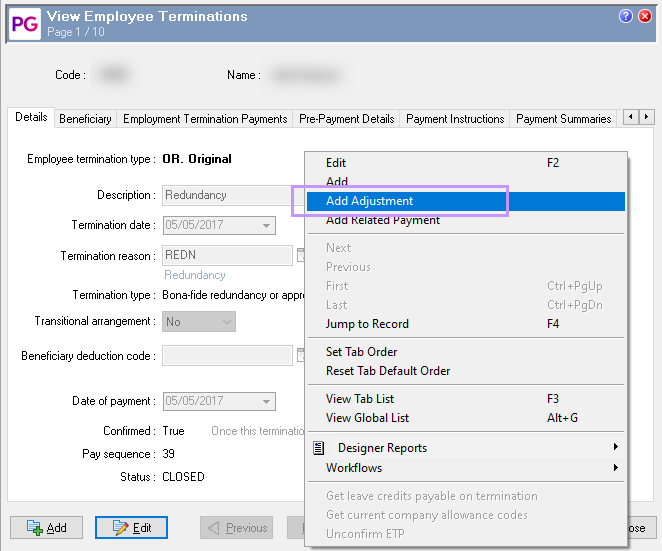
-
Enter a clear Description and the correct Date of payment for the adjustment.
-
Update the Termination Date field only; do not change any figures on the Employment Termination Payments tab.
-
Save & Close the adjustment.
-
Re-process the Employee's Termination
-
Create a new pay sequence (eg. Manual Pay) and terminate the employee again.
-
Submit the Updated STP File to the ATO
-
Submit this STP pay event to the ATO to update their records.
Important:
This method does not require rolling back any processed pays and preserves previous payment records.
The net result should be $0.00, as no extra payments are being made — only the Termination Date is being updated for compliance.
For more detailed information and troubleshooting, see:
Understanding Terminations and Eligible Termination Payments (ETPs)
If you need to correct a Termination Date for a standard termination processed (not an ETP), then you will need to process a new termination transaction via a manual pay with the correct date.